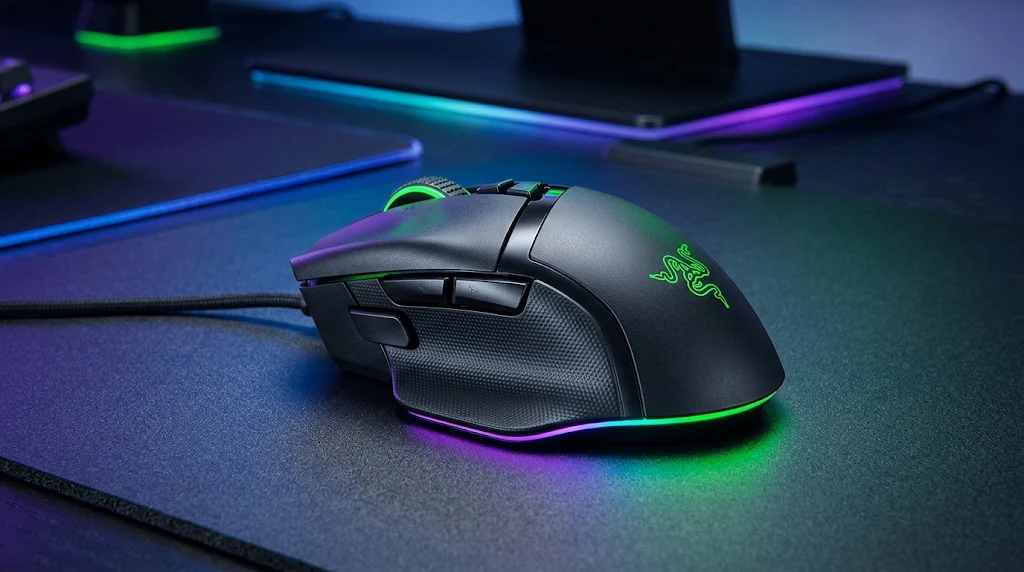
A gaming mouse is an important part of a PC gaming setup. It helps users control movement, interact with game environments, and perform different actions with greater convenience. Choosing the right mouse involves considering several factors, including sensor accuracy, button placement, comfort, sensitivity, and connectivity. The Razer Basilisk V3 Gaming Mouse is designed to combine these features in one customizable wired device.
Developed by Razer, the Basilisk V3 is a right handed gaming mouse known for its ergonomic shape, programmable buttons, optical sensor, and customizable RGB lighting. One of its most recognizable features is the Razer HyperScroll Tilt Wheel, which offers both tactile scrolling and free spinning functionality.
The mouse also features Razer Chroma RGB lighting with eleven customizable zones. Users can adjust lighting effects, create personalized profiles, and configure supported controls through Razer Synapse software. These options make the Basilisk V3 suitable for gamers who enjoy customizing their peripherals.
Another important feature is its Focus+ optical sensor, which supports up to 26,000 DPI. Combined with a maximum tracking speed of 650 IPS and acceleration of 50G, the sensor provides the tracking capabilities needed for different gaming activities. Razer+1
However, the Basilisk V3 is not designed for everyone. Its wired connection and relatively substantial weight may not appeal to users who prefer lightweight wireless gaming mice. Understanding its features and limitations can help buyers determine whether it fits their gaming requirements.
Table of Contents
What Is the Razer Basilisk V3 Gaming Mouse?
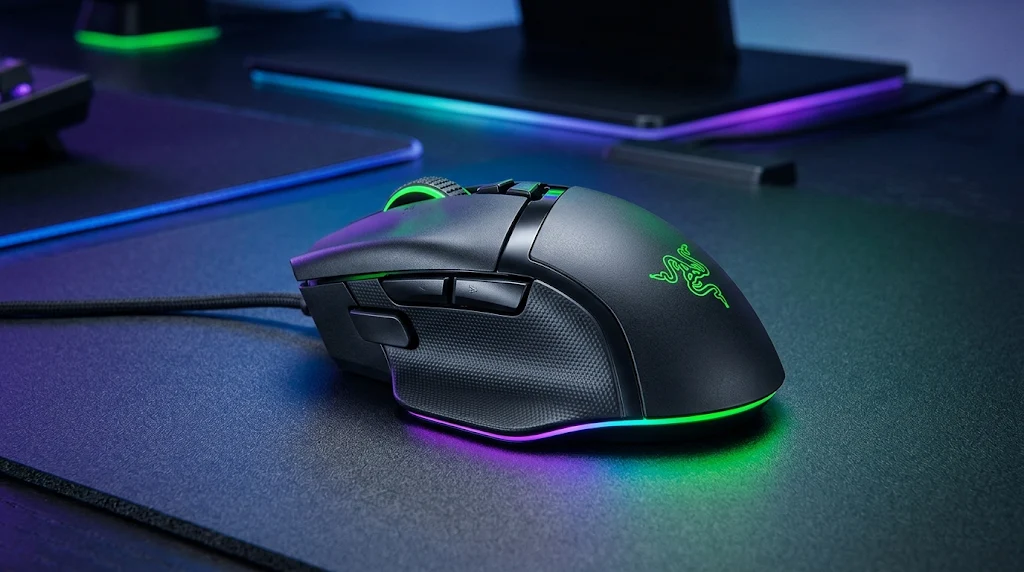
The Razer Basilisk V3 Gaming Mouse is a customizable wired optical gaming mouse designed for PC users who want advanced controls and comfortable handling. It belongs to Razer’s Basilisk product family, which focuses on ergonomic gaming designs and additional programmable controls.
Unlike a basic computer mouse, the Basilisk V3 includes eleven programmable buttons, a four way HyperScroll Tilt Wheel, adjustable DPI settings, and customizable Chroma RGB lighting. These features allow users to personalize their mouse for gaming, browsing, and productivity.
Its optical sensor is designed to provide accurate tracking, while its PTFE mouse feet support smooth movement across compatible surfaces. The mouse also includes onboard memory for storing supported profiles.
The Basilisk V3 is particularly interesting because it combines gaming focused features with practical everyday functions. Its free spinning scroll wheel, for example, can be useful for navigating long documents and websites as well as managing in game controls.
It is important to distinguish the original Basilisk V3 from newer products in the Basilisk family. The original wired Basilisk V3 has a Focus+ sensor with a maximum sensitivity of 26,000 DPI, while newer variations can have different sensor specifications and features.
Design and Build Quality
The design of the Razer Basilisk V3 is one of its strongest characteristics. It features an ergonomic right handed body with a dedicated thumb rest, textured rubber grips, and strategically positioned buttons.
Its shape is designed to support comfortable handling during extended computer sessions. The mouse has a modern black finish, with customizable RGB lighting adding a distinctive gaming appearance.
The construction combines a solid outer body with carefully positioned controls. Its design is more substantial than that of many minimalist gaming mice, making it particularly appealing to users who prefer a fuller ergonomic shape.
Ergonomic Right Handed Design
The Basilisk V3 uses a right handed ergonomic design. Its curved body supports the palm, while the thumb rest provides a dedicated resting position.
This arrangement can make the mouse comfortable for users who prefer palm and claw style grips. The textured side grips also help provide a secure hold during regular movement.
The placement of the side buttons allows users to access additional commands without constantly moving their fingers away from the main controls. However, people with smaller hands may find some buttons less accessible.
The shape is an important consideration because mouse comfort depends on individual hand size and grip preference. Trying the mouse before purchasing can help determine whether its dimensions are suitable.
Comfortable Grip and Button Placement
The Basilisk V3 includes several buttons around its body, including additional controls near the thumb rest area. These controls are designed to make frequently used functions easier to access.
Its textured surfaces provide additional grip, while the curved design helps support a natural hand position. This can be useful during longer gaming sessions and everyday computer activities.
The mouse is approximately 130 mm long, 75 mm wide, and 42.5 mm high. Its weight is approximately 101 grams without the cable, according to Razer’s specifications. Razer+1
These dimensions make it a relatively substantial mouse. Users who prefer compact equipment or extremely lightweight gaming mice should consider this before purchasing.
Scroll Wheel Design
The scroll wheel is a major part of the Basilisk V3’s design. It supports traditional tactile scrolling as well as a free spinning mode.
Its four way functionality also supports horizontal scrolling through left and right tilt inputs. This can be particularly useful when navigating wide spreadsheets, large documents, or lengthy websites.
The wheel is supported by dedicated controls that allow users to change its scrolling behavior. These options make the mouse useful for activities that involve frequent scrolling.
The HyperScroll system is one of the features that separates the Basilisk V3 from simpler gaming mice. It provides additional flexibility without requiring a separate navigation device.
Optical Sensor and Tracking Performance
A gaming mouse’s sensor determines how accurately it detects physical movement. The Razer Basilisk V3 uses a Focus+ optical sensor designed to provide precise tracking across different surfaces.
Its maximum sensitivity reaches 26,000 DPI, while its maximum tracking speed is rated at 650 IPS. The sensor also supports acceleration up to 50G. Razer+1
These specifications make it suitable for users who want a broad range of sensitivity options and responsive movement.
Focus+ Optical Sensor
The Focus+ optical sensor is one of the main technical features of the Basilisk V3. It is designed to detect movement accurately and translate it into consistent cursor positioning.
This is important in games where users need to move between different objects, control camera angles, or interact with small interface elements.
Razer also introduced intelligent sensor functions, including adjustable lift off and landing distance. These options allow supported sensor behavior to be configured according to the user’s preferences.
The sensor’s performance still depends on the surface and computer environment. Using a suitable mouse pad can help provide consistent tracking.
Tracking Accuracy and Speed
The Basilisk V3 supports tracking speeds of up to 650 inches per second. This specification describes the maximum speed at which the sensor is designed to track physical movement.
Its 50G acceleration rating also describes the level of acceleration the sensor can recognize under supported conditions.
These specifications are useful when comparing gaming mice, but they should not be treated as a guarantee of better gaming results. Actual performance also depends on the user’s experience, sensitivity settings, game requirements, and computer configuration.
For everyday gaming, consistent tracking and comfortable control are generally more important than simply choosing the highest available specifications.
DPI Settings and Sensitivity
DPI stands for dots per inch and describes the relationship between physical mouse movement and cursor movement. A higher DPI setting generally makes the cursor travel farther with less physical movement.
The Razer Basilisk V3 supports a maximum sensitivity of 26,000 DPI. Users can adjust their settings to find a comfortable balance between speed and control.
Adjustable DPI Levels
The mouse provides multiple sensitivity stages that can be configured through Razer Synapse.
Razer’s default sensitivity stages include 400, 800, 1,600, 3,200, and 6,400 DPI. Users can customize these settings to match their preferred gaming style. Razer Newsroom+1
A lower setting may be suitable for users who prefer controlled cursor movements, while a higher setting can make general navigation quicker.
The best DPI setting depends on the user’s screen resolution, preferred mouse movement, and gaming requirements.
On the Fly Sensitivity Adjustment
The Basilisk V3 includes a dedicated DPI cycle button that allows users to switch between configured sensitivity stages.
This feature can be useful when changing between games or applications with different control requirements.
Users can also configure supported sensitivity functions through Razer Synapse. This provides greater flexibility than relying only on the factory settings.
Instead of selecting the highest DPI automatically, users should experiment with different levels until they find a comfortable configuration.
Programmable Buttons and Customization
One of the most attractive features of the Razer Basilisk V3 Gaming Mouse is its programmable button system. The device includes eleven programmable buttons that allow users to assign different commands.
These controls can be helpful for gaming activities that involve multiple actions. They can also support everyday shortcuts in compatible applications.
Custom Button Assignments
The Basilisk V3 provides multiple controls beyond the standard left and right mouse buttons.
Users can configure supported buttons for keyboard shortcuts, application commands, and other functions through Razer Synapse.
For example, someone playing a strategy game might assign additional controls to frequently used actions. Another user could configure buttons for browsing shortcuts or document navigation.
This flexibility makes the mouse suitable for people who want to personalize their equipment rather than use a fixed button layout.
Razer HyperShift Functionality
Razer HyperShift provides an additional layer of button customization. It allows supported buttons to perform alternative functions while a designated HyperShift control is held.
This effectively gives users access to additional commands without adding more physical buttons to the mouse.
For example, a user can configure one set of controls for normal use and another set for a temporary alternative layout.
HyperShift is particularly useful for applications and games that require multiple shortcuts. However, users should organize their assignments carefully so that the controls remain easy to remember.
Razer HyperScroll Technology
The Razer HyperScroll Tilt Wheel is arguably the most distinctive feature of the Basilisk V3. Unlike a standard scroll wheel, it offers electronically actuated tactile and free spinning modes.
This allows users to choose between controlled scrolling and faster navigation depending on the task.
Tactile Scrolling Mode
Tactile mode provides traditional notched scrolling. Each movement produces a more defined scrolling step, making it easier to control navigation.
This mode can be useful when selecting menu options, browsing shorter pages, or making precise adjustments in supported applications.
It also provides a familiar scrolling experience for people who prefer individual wheel movements rather than continuous rotation.
Free Spin Scrolling Mode
Free spin mode allows the scroll wheel to rotate more freely. This makes it easier to move through lengthy web pages, documents, and other content.
It can save time when navigating large amounts of information because the wheel can cover more distance with a single movement.
The Basilisk V3 also supports Smart Reel functionality through compatible Razer Synapse settings. This can automatically switch between scrolling behaviors based on how quickly the wheel is moved.
Four Way Tilt Scrolling
The HyperScroll wheel also supports left and right tilt inputs.
These controls can be assigned to supported functions, providing additional navigation options without using separate buttons.
For people who work with wide documents and spreadsheets, horizontal scrolling can be particularly convenient.
The combination of tactile, free spin, and tilt functionality makes the scroll wheel one of the mouse’s most useful everyday features.
RGB Lighting and Razer Chroma
RGB lighting is a common feature in modern gaming equipment, and the Basilisk V3 provides extensive customization through Razer Chroma RGB.
It includes eleven customizable lighting zones, allowing users to create different visual effects across the mouse.
The lighting can complement other compatible Razer peripherals and help create a coordinated gaming setup.
Eleven RGB Lighting Zones
The Basilisk V3 includes eleven Chroma RGB lighting zones. These zones provide several opportunities for customizing its appearance.
Users can select individual colors, adjust supported effects, and create lighting combinations that match their desk setup.
Some people prefer subtle lighting, while others enjoy colorful effects that make their gaming equipment more visually distinctive.
The RGB system is mainly an aesthetic feature. It does not directly improve the mouse’s sensor accuracy or tracking performance.
Custom Lighting Effects
Razer Synapse provides access to supported lighting settings and Chroma effects.
Users can create lighting combinations and coordinate compatible peripherals through the Razer Chroma ecosystem.
This can be useful for people who own multiple Razer devices and want a consistent appearance across their setup.
However, users who prefer a simple mouse without lighting effects can also configure the available settings to suit their preferences.
Razer Synapse Software
Razer Synapse is the software environment used to configure compatible Razer gaming peripherals.
For the Basilisk V3, it provides access to button assignments, sensitivity settings, RGB lighting, and supported profile features.
The software is important for users who want to take advantage of the mouse’s advanced customization options.
Button and DPI Configuration
Through Razer Synapse, users can configure the functions of programmable buttons and adjust their preferred sensitivity levels.
They can also create different settings for supported games and applications.
This makes it easier to use one mouse for several activities without manually changing every setting each time.
The software provides more control than the standard mouse settings available through a computer’s operating system.
Profiles and Onboard Memory
The Basilisk V3 supports onboard memory for up to five profiles, including supported hybrid onboard and cloud storage functionality. Razer+1
This allows users to save compatible configurations and access supported settings when moving between computers.
For gamers who use different button assignments and sensitivity settings, profiles can make the experience more convenient.
Users should check the software and firmware requirements to ensure their preferred settings are saved correctly.
Gaming Performance and User Experience
The Razer Basilisk V3 is designed for gamers who want accurate tracking, customizable controls, and comfortable handling. Its combination of an optical sensor, programmable buttons, and flexible scroll wheel makes it suitable for several gaming environments.
The wired USB connection provides a direct connection to the computer without requiring battery charging. Its Speedflex cable is designed to be flexible, helping reduce the feeling of cable resistance during normal mouse movement.
The mouse also features optical switches designed for responsive clicking. Razer rates the second generation optical mouse switches used in the original Basilisk V3 for up to 70 million clicks. Razer+1
Wired Connectivity and Responsiveness
The Basilisk V3 uses a wired USB connection, making it a convenient option for users who prefer not to manage wireless batteries.
Its Speedflex cable is designed to be flexible and lightweight compared with many traditional mouse cables. This helps make everyday movement more comfortable.
A wired connection also removes the need for wireless pairing and charging. Users can connect the mouse and configure its settings through compatible software.
However, the cable can be a disadvantage for people who prefer a clean wireless desk setup. Users who frequently travel with their gaming equipment may also prefer a more portable wireless model.
Optical Mouse Switches
The original Basilisk V3 features second-generation Razer optical mouse switches. These switches use optical actuation technology and are rated for up to 70 million clicks.
Optical switches are designed to register clicks through light-based detection rather than relying entirely on traditional mechanical contact mechanisms.
This technology is intended to provide responsive clicking and reduce certain issues associated with conventional mechanical switches.
The actual long-term experience can depend on usage, maintenance, and product condition. Nevertheless, the rated switch lifecycle is an important specification for people comparing gaming peripherals.
Smooth Mouse Movement
The Basilisk V3 includes 100% PTFE mouse feet designed to provide smooth movement across compatible surfaces.
PTFE is commonly used in gaming mouse feet because of its low friction properties. It can help the mouse glide comfortably during normal computer use.
A quality mouse pad can further improve the consistency of movement and help maintain a suitable tracking surface.
The overall experience depends on the combination of mouse weight, desk surface, grip preference, and individual movement habits.
Performance Across Different Game Genres
Different games place different demands on gaming peripherals. Some require quick camera movement, while others involve many commands, interface interactions, and navigation tasks.
The Razer Basilisk V3 offers a flexible control layout that can accommodate several gaming styles.
First Person and Third Person Games
Games involving camera movement and precise cursor control can benefit from the Basilisk V3’s Focus+ optical sensor.
Its adjustable sensitivity allows players to experiment with different settings and select a comfortable configuration.
The programmable buttons can also provide convenient access to supported commands without requiring constant keyboard interaction.
However, its approximately 101 gram weight may feel substantial to players who prefer lightweight gaming mice for frequent movement.
Strategy and Simulation Games
Strategy and simulation games often involve multiple commands, menus, and interface controls.
The Basilisk V3’s programmable buttons can help make these activities more convenient. Users can assign frequently used shortcuts to additional controls and create different profiles for supported games.
Its HyperScroll wheel is also useful for navigating large menus, documents, and information panels.
For people who enjoy games with complex control systems, the mouse offers a useful combination of buttons and scrolling options.
Adventure and Role Playing Games
Adventure and role playing games often involve inventory management, character abilities, navigation, and interaction with different objects.
The Basilisk V3 can support these activities through its additional buttons and customizable profiles.
Users can configure supported functions to make frequently used commands easier to access.
Its ergonomic shape can also provide a comfortable handling experience for people who prefer a fuller right handed mouse design.
Multiplayer and Competitive Gaming
The Basilisk V3 offers several features that can support multiplayer gaming, including customizable sensitivity and responsive optical switches.
Its sensor specifications provide a strong foundation for accurate tracking, while the programmable buttons offer additional control options.
However, competitive players may have different preferences regarding weight, shape, and button placement.
Someone who prioritizes a lightweight design may prefer a different mouse, while someone who values extra controls may appreciate the Basilisk V3.
Everyday Use and Productivity
Although the Razer Basilisk V3 is marketed as a gaming mouse, its features can also be useful for general computer activities.
The HyperScroll wheel, programmable buttons, and adjustable sensitivity make it suitable for more than gaming.
This versatility can be particularly useful for users who regularly switch between entertainment, browsing, and work.
Office Work and Web Browsing
The free spinning scroll wheel can help users navigate long web pages and documents.
Its programmable buttons can also be configured for supported navigation commands and frequently used shortcuts.
For example, users can assign functions that help them move between applications or perform repetitive tasks more conveniently.
The adjustable sensitivity also allows users to select a cursor speed that feels comfortable for their screen and working environment.
Creative Applications
The Basilisk V3 can also support certain creative workflows.
People who work with image editing software, design applications, and digital content tools may benefit from assigning frequently used shortcuts to its programmable buttons.
Its four way scroll wheel can also help when navigating wide documents and detailed interfaces.
However, it is important to remember that a gaming mouse does not replace specialized drawing equipment or professional creative hardware. Its usefulness depends on the applications and tasks being performed.
Multimedia and General Navigation
The HyperScroll wheel makes the Basilisk V3 particularly useful for general navigation.
Free spinning mode can help users move through long pages, while tactile mode offers more controlled scrolling.
Its side buttons can also be configured for supported navigation functions.
These features make the mouse a versatile choice for people who want gaming controls and practical everyday functionality in one device.
Razer Basilisk V3 Reviews and User Feedback
The Razer Basilisk V3 has received attention from technology reviewers because of its ergonomic design, programmable buttons, and HyperScroll technology.
Reviews generally highlight its extensive customization options and comfortable shape. Independent testing also identifies its tracking performance and scroll wheel as important strengths. TechRadar+1
However, reviews also point out that the mouse is relatively bulky and that its wired only design may not suit every user.
What Reviewers Appreciate
One of the most frequently highlighted features is the HyperScroll Tilt Wheel.
Its combination of tactile and free spinning modes provides flexibility for gaming and everyday navigation. The additional horizontal scrolling controls also make it useful for working with wide documents.
The programmable buttons are another advantage because they allow users to configure different commands for supported games and applications.
Reviewers have also highlighted the mouse’s comfortable right handed design and flexible cable. These characteristics contribute to its appeal as a versatile desktop gaming peripheral.
Common Criticisms
The Basilisk V3 is not a lightweight mouse. Its approximately 101 gram weight may feel heavy to users who prefer smaller and lighter gaming equipment.
Its right handed design is another limitation because left handed users may find the shape unsuitable.
The wired connection may also disappoint buyers who want a wireless setup.
Additionally, some of its advanced customization features require Razer Synapse. Users who prefer a simple mouse without additional software may not need all the available options.
Overall Review Perspective
The Basilisk V3 is best understood as a feature rich ergonomic gaming mouse rather than a minimalist competitive mouse.
Its main strengths are customization, scrolling flexibility, tracking specifications, and its comfortable right handed shape.
Its limitations are primarily related to weight, size, and wired connectivity.
The mouse can be a strong option for users whose preferences match its design, but comparing alternatives remains important before making a purchase.
Advantages and Disadvantages of the Razer Basilisk V3
Understanding the advantages and disadvantages of a gaming mouse helps buyers make a more informed decision.
The Basilisk V3 offers several useful features, but it also has limitations that may affect different types of users.
Advantages
- Focus+ optical sensor with up to 26,000 DPI.
- Eleven programmable buttons.
- Ergonomic right handed design.
- Razer HyperScroll Tilt Wheel.
- Tactile and free spinning scrolling modes.
- Four way tilt scrolling.
- Eleven Razer Chroma RGB lighting zones.
- Customizable settings through Razer Synapse.
- Flexible Speedflex wired cable.
- Second generation optical mouse switches.
- Up to five onboard memory profiles.
- 100% PTFE mouse feet.
Disadvantages
- Wired only connectivity.
- Approximately 101 gram weight.
- Right handed ergonomic design.
- Relatively large body for some users.
- Certain buttons may be difficult to reach with smaller hands.
- Advanced customization depends on compatible software.
- RGB lighting may be unnecessary for users who prefer simple peripherals.
Overall, the advantages make the Basilisk V3 an attractive option for people who want a customizable gaming mouse. Its disadvantages are important considerations for anyone prioritizing portability, minimal weight, or wireless convenience.
Technical Specifications of the Razer Basilisk V3 Gaming Mouse
Technical specifications help buyers understand what a gaming mouse offers and how it compares with other products.
The following table summarizes the main specifications of the original wired Razer Basilisk V3.
| Specification | Details |
|---|---|
| Product Name | Razer Basilisk V3 |
| Product Type | Wired Gaming Mouse |
| Sensor | Razer Focus+ Optical |
| Maximum DPI | 26,000 DPI |
| Maximum Speed | 650 IPS |
| Maximum Acceleration | 50G |
| Programmable Buttons | 11 |
| Switch Type | Razer Optical Mouse Switches Gen 2 |
| Switch Lifecycle | 70 Million Clicks |
| RGB Lighting | Razer Chroma RGB |
| RGB Zones | 11 |
| Connectivity | Wired USB |
| Cable | Razer Speedflex |
| Scroll Wheel | Four Way HyperScroll Tilt Wheel |
| Scrolling Modes | Tactile and Free Spin |
| Onboard Memory | Up to 5 Profiles |
| Mouse Feet | 100% PTFE |
| Dimensions | 130 × 75 × 42.5 mm |
| Weight | Approximately 101g |
| Software | Razer Synapse |
Source: Razer’s official product specifications. Razer+1
These specifications show that the Basilisk V3 focuses on versatility and customization. Its sensor provides a broad sensitivity range, while its additional buttons and scroll wheel offer more control than a basic mouse.
The weight and dimensions are particularly important for buyers who prefer a specific grip style. Checking these details before purchasing can help avoid choosing a mouse that feels uncomfortable.
Razer Basilisk V3 vs Other Gaming Mice
Comparing the Basilisk V3 with other gaming mice can help buyers understand its strengths and limitations.
Its closest alternatives include other ergonomic gaming mice with additional controls, customizable sensitivity, and advanced sensor technology.
The following table compares the Basilisk V3 with the Logitech G502 HERO and the Razer DeathAdder V3.
| Feature | Razer Basilisk V3 | Logitech G502 HERO | Razer DeathAdder V3 |
|---|---|---|---|
| Connectivity | Wired | Wired | Wired |
| Sensor | Focus+ | HERO 25K | Focus Pro 30K |
| Maximum DPI | 26,000 | 25,600 | 30,000 |
| Programmable Buttons | 11 | 11 | 6 |
| RGB Lighting | 11 zones | LIGHTSYNC | No RGB |
| Scroll Wheel | HyperScroll Tilt | Dual Mode | Standard |
| Adjustable Weights | No | Yes | No |
| Approximate Weight | 101g | 121g | 59g |
| Design | Ergonomic right handed | Ergonomic right handed | Ergonomic right handed |
| Main Strength | Scroll customization | Button and weight customization | Lightweight design |
Specifications are for the respective wired models; exact configurations and revisions should be checked before purchasing.
Razer Basilisk V3 vs Logitech G502 HERO
The Razer Basilisk V3 and Logitech G502 HERO are two recognizable wired gaming mice with ergonomic right handed designs.
Both offer eleven programmable buttons, adjustable sensitivity, and additional controls for different gaming activities.
One major difference is the scroll wheel. The Basilisk V3 offers its HyperScroll Tilt Wheel with tactile and free spinning modes, while the G502 HERO provides a dual mode scroll wheel.
The Logitech G502 HERO also includes an adjustable weight system, whereas the Basilisk V3 does not.
The Basilisk V3 is lighter at approximately 101 grams compared with the G502 HERO’s approximately 121 gram base weight. This may make a difference for users who prefer a somewhat lighter mouse.
The better option depends on personal preference. Users who prioritize scrolling flexibility may prefer the Basilisk V3, while people who want adjustable weights may prefer the G502 HERO.
Razer Basilisk V3 vs Razer DeathAdder V3
The Basilisk V3 and DeathAdder V3 are designed around different priorities.
The Basilisk V3 emphasizes customization, additional buttons, RGB lighting, and scroll wheel functionality. The DeathAdder V3 focuses more on lightweight ergonomic design and simpler controls.
The Basilisk V3 offers eleven programmable buttons, while the DeathAdder V3 wired version has fewer buttons. This makes the Basilisk more suitable for people who want multiple shortcuts.
The DeathAdder V3 is considerably lighter, which may appeal to users who prioritize easy movement and a minimalist design.
People who prefer extra functionality may find the Basilisk V3 more attractive, while those who want a lightweight mouse may prefer the DeathAdder V3.
Razer Basilisk V3 vs Wireless Gaming Mice
Wireless gaming mice are becoming increasingly popular because they provide more freedom of movement and help create a cleaner desk setup.
The Basilisk V3 uses a wired connection, so it does not require a battery or charging system.
Wireless alternatives may provide greater portability, but buyers should compare their battery performance, connection technology, sensor specifications, and overall price.
The right choice depends on whether the user values wireless convenience or prefers a direct USB connection.
Who Should Buy the Razer Basilisk V3 Gaming Mouse?
The Razer Basilisk V3 is designed for people who want a customizable gaming mouse with additional controls and an ergonomic shape.
Its features make it suitable for several types of users, although its weight and wired connection should be considered before purchasing.
PC Gaming Enthusiasts
PC gaming enthusiasts who enjoy customizing their equipment may appreciate the Basilisk V3.
Its programmable buttons, adjustable sensitivity, and Chroma RGB lighting provide several ways to personalize the gaming experience.
The HyperScroll wheel also offers practical functionality beyond standard gaming controls.
Users Who Prefer Ergonomic Mice
People who prefer a fuller right handed mouse shape may find the Basilisk V3 comfortable.
Its thumb rest, textured grips, and curved body are designed to provide a secure handling experience.
However, comfort depends on individual hand size and grip style, so it is worth checking the dimensions before purchasing.
Gamers Who Need Extra Buttons
The eleven programmable buttons make the Basilisk V3 attractive to users who regularly use multiple commands.
People who play strategy, adventure, and simulation games may find these additional controls useful.
The mouse can also support productivity shortcuts, making it suitable for people who use their computers for both gaming and everyday work.
Users Who Enjoy RGB Customization
The Basilisk V3 is also suitable for people who enjoy personalized gaming setups.
Its eleven Chroma RGB zones provide multiple lighting customization options.
Users with other compatible Razer peripherals can also coordinate supported lighting effects across their gaming environment.
Why Is the Razer Basilisk V3 Popular?
The Razer Basilisk V3 remains a recognizable gaming mouse because it combines several practical features in one device.
Its ergonomic design, programmable controls, optical sensor, and HyperScroll technology create a versatile package for users who want more customization than a basic mouse provides.
Unique HyperScroll Technology
The HyperScroll Tilt Wheel is one of the mouse’s most recognizable features.
Its ability to switch between tactile and free spinning scrolling makes it useful for both gaming and everyday navigation.
This combination is particularly attractive to people who regularly move between gaming applications, websites, and lengthy documents.
Customizable Gaming Experience
Another reason for its popularity is the number of available customization options.
Users can adjust sensitivity, configure buttons, create profiles, and personalize RGB lighting through Razer Synapse.
This makes the mouse adaptable to different applications and personal preferences.
Established Razer Gaming Ecosystem
Razer has developed a wide range of gaming peripherals, including keyboards, headsets, mice, and other accessories.
The Basilisk V3 benefits from its compatibility with Razer’s software ecosystem and Chroma RGB environment.
People who already use compatible Razer products may appreciate having another peripheral that works within the same customization system.
Latest Update: Razer Basilisk V3 in 2026
As of November 2026, the original Razer Basilisk V3 remains an established wired gaming mouse in the Basilisk product family.
Its main characteristics continue to include the Focus+ optical sensor, 26,000 DPI sensitivity, eleven programmable buttons, HyperScroll technology, and eleven Chroma RGB lighting zones.
It is important to distinguish the original Basilisk V3 from newer variations such as the Basilisk V3 35K. These products have different sensor specifications and should not be treated as identical models.
The original Basilisk V3 supports up to 26,000 DPI, while the newer 35K variation has a different sensor configuration. Razer+1
Software and Compatibility Considerations
Razer Synapse is the main software environment for configuring supported Basilisk V3 features.
Users should check the official Razer support website for software compatibility, firmware updates, and troubleshooting information.
It is also worth checking whether the product listing specifically describes the original Basilisk V3 rather than another model in the same product family.
Is the Original Basilisk V3 Still Worth Considering?
An older gaming mouse can still be a worthwhile purchase if it provides the features a buyer needs.
The original Basilisk V3 offers an extensive control layout, an advanced optical sensor, and a distinctive scroll wheel.
However, buyers should compare its current price with newer alternatives. If a newer model offers useful improvements at a similar price, it may be worth considering.
Checking warranty coverage, product authenticity, and seller reputation is equally important.
Buying Tips for the Razer Basilisk V3 Gaming Mouse
Choosing the right gaming mouse involves more than comparing DPI numbers and RGB lighting.
Buyers should consider their preferred grip, desk arrangement, gaming requirements, and budget before making a decision.
Check the Original Model
Razer offers several products within the Basilisk family.
Make sure the product listing specifically identifies the original Razer Basilisk V3 if that is the model you want.
Different Basilisk variations may have different sensors, switches, connectivity options, and weights.
Consider Your Preferred Mouse Weight
The original Basilisk V3 weighs approximately 101 grams without its cable.
This is a relatively substantial weight compared with lightweight gaming mice.
People who prefer a fuller ergonomic design may appreciate it, while users who want an especially lightweight mouse may prefer another model.
Check Compatibility and Software
Before purchasing, check whether your operating system supports the required Razer software.
Razer Synapse provides access to advanced customization options, including button assignments, sensitivity settings, and lighting effects.
Users who only need standard mouse functions may not need to configure every available feature.
Compare Prices and Warranty
The price of the Razer Basilisk V3 can vary between retailers and regions.
Compare prices from reputable sellers and check the included warranty before purchasing.
If buying online, review the return policy and make sure the product is genuine.
For buyers in Pakistan, it is also worth checking local warranty coverage and whether the seller provides proper after sales support.
Frequently Asked Questions About the Razer Basilisk V3 Gaming Mouse
Is the Razer Basilisk V3 good for gaming?
Yes, the Razer Basilisk V3 is a capable gaming mouse with a Focus+ optical sensor, eleven programmable buttons, and adjustable DPI settings. Its ergonomic design and customizable controls make it suitable for different gaming genres. However, its weight may not appeal to everyone.
What is the maximum DPI of the Razer Basilisk V3?
The original Razer Basilisk V3 supports a maximum sensitivity of 26,000 DPI. Its Focus+ optical sensor provides a broad sensitivity range, allowing users to configure different settings through Razer Synapse.
How many programmable buttons does the Razer Basilisk V3 have?
The Razer Basilisk V3 features eleven programmable buttons. Users can assign supported gaming commands, keyboard shortcuts, and application functions through Razer Synapse.
Is the Razer Basilisk V3 wired or wireless?
The original Razer Basilisk V3 is a wired gaming mouse. It connects through USB using a Razer Speedflex cable. Users who want a wireless mouse should consider a separate wireless model in the Basilisk family.
Does the Razer Basilisk V3 have RGB lighting?
Yes, it includes eleven customizable Razer Chroma RGB lighting zones. Users can personalize colors and lighting effects through compatible Razer software.
What is the HyperScroll wheel on the Razer Basilisk V3?
The HyperScroll Tilt Wheel is a customizable scroll wheel that supports tactile and free spinning modes. It also provides left and right tilt functionality for supported horizontal scrolling and additional commands.
Is the Razer Basilisk V3 comfortable for long gaming sessions?
Its ergonomic right handed design, thumb rest, and textured grips are intended to provide comfortable handling. However, comfort depends on hand size and grip preference. Its approximately 101 gram weight may also feel substantial to users who prefer lightweight mice.
Does the Razer Basilisk V3 work without Razer Synapse?
Yes, the mouse can perform basic functions through a standard USB connection without requiring Razer Synapse. However, advanced customization, including programmable buttons, lighting adjustments, and detailed sensitivity configuration, requires compatible software.
Final Conclusion
The Razer Basilisk V3 Gaming Mouse is a feature rich wired gaming peripheral designed for users who value customization, ergonomic handling, and flexible controls. Its Focus+ optical sensor, 26,000 DPI sensitivity, eleven programmable buttons, and HyperScroll Tilt Wheel make it an interesting choice for different types of PC gamers.
You may also find this blog on below website :
Try Our free tools :

Muhammad khubaib
Gaming editor and browser game strategist at PlayStrom.
📖 Related Blog Articles
GTRACING Gaming Chair: Features, Comfort, Models, Pros, Cons, and Buying Guide
A gaming chair should support your posture, fit your desk, and remain comfortable during long gaming sessions. The GTRACING gaming chair offers…

Best PS5 Games: Top Games Worth Playing in 2026
Finding the best PS5 games is easier when you know what kind of experience you actually want. From creative adventures and competitive…
Will GTA 6 Be on PC? Release Date, Rumours and Latest News
Many gamers are asking: will GTA 6 be on PC? While a PC version is reportedly planned, Rockstar Games has not officially…
Related & Recommended Games

2048 Neon Edition
2048 Neon Edition is a custom-coded sliding tile puzzle game built from scratch using HTML5 and Vanilla JS.

Neon Snake Arcade
Neon Snake Arcade is a custom free web browser snake game built natively with HTML5 canvas and responsive touch controls.

2048 Puzzle Web
2048 is a free daily sliding block puzzle browser game where players slide numbered tiles to merge them into 2048.