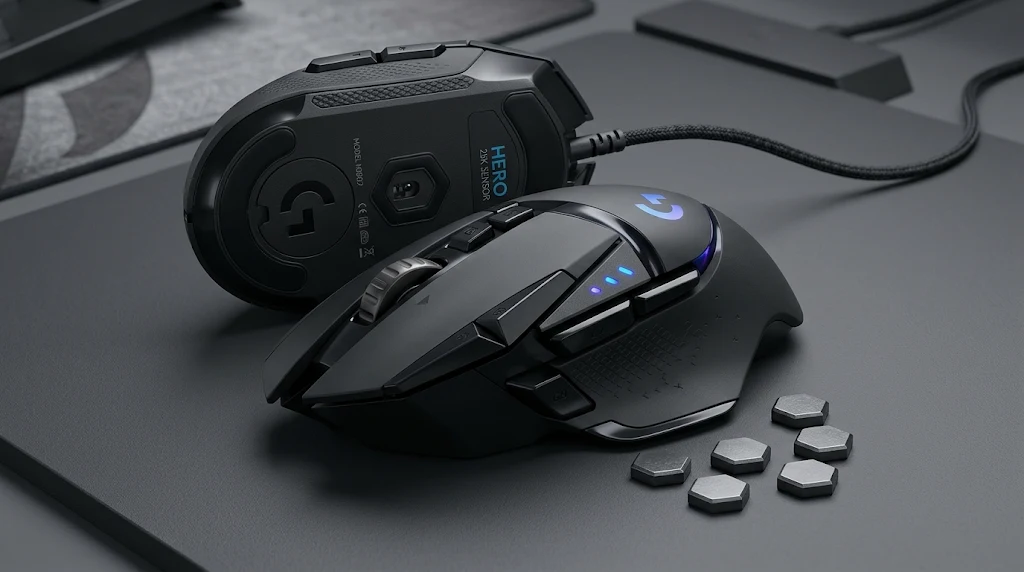
Choosing the right gaming mouse can make a noticeable difference in how comfortably and accurately you play PC games. A good gaming mouse should offer reliable tracking, responsive buttons, comfortable handling, and customization options that match different gaming styles. Among the popular wired gaming mice, the Logitech G502 HERO Gaming Mouse has maintained a strong reputation because of its combination of advanced sensor technology, programmable controls, and adjustable weight.
Designed by Logitech G, the G502 HERO is built for gamers who want more control over their gaming experience. It combines an optical HERO sensor, customizable sensitivity settings, eleven programmable buttons, LIGHTSYNC RGB lighting, and a dual mode scroll wheel. These features make it useful for different types of PC games as well as everyday computer activities.
One of the most interesting aspects of this mouse is its customization. Instead of offering only basic left and right buttons, it provides several additional controls that users can configure for their preferred commands. The adjustable weight system also allows players to change how the mouse feels during use.
The Logitech G502 HERO Gaming Mouse is a wired model, which means it does not require battery charging. Its USB connection provides consistent connectivity, while its high polling rate supports responsive cursor movement. However, its relatively substantial weight and wired design may not suit every player.
This guide explores its design, specifications, gaming performance, customization features, advantages, disadvantages, and alternatives to help readers understand whether it is a suitable gaming mouse.
Table of Contents
What Is the Logitech G502 HERO Gaming Mouse?
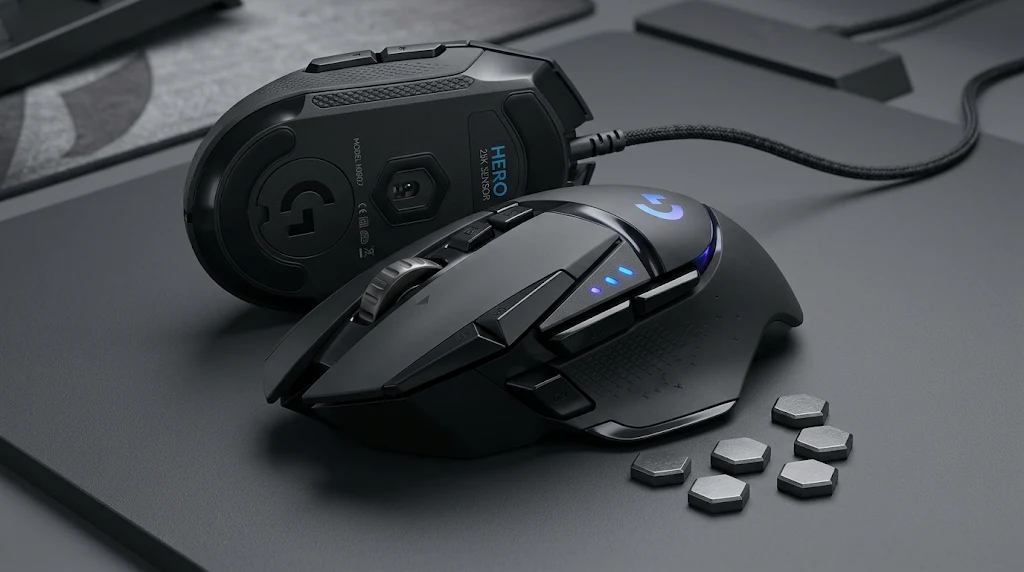
The Logitech G502 HERO Gaming Mouse is a high performance wired optical mouse designed primarily for PC gaming. It belongs to Logitech’s G series gaming peripherals and is known for its customizable controls, accurate tracking, and distinctive ergonomic design.
The mouse uses Logitech’s HERO sensor technology, which provides a wide sensitivity range and accurate cursor tracking. Its updated HERO 25K configuration supports sensitivity settings up to 25,600 DPI, making it suitable for users who prefer different cursor speeds for different applications.
Unlike simple office mice, the G502 HERO includes eleven programmable buttons. These buttons can be assigned different functions through Logitech G HUB software. Players can configure commands for their favorite games, while everyday computer users can assign shortcuts for frequently used tasks.
Another important feature is its adjustable weight system. The mouse comes with five optional weights, each weighing 3.6 grams. Users can experiment with different weight arrangements to find a comfortable balance.
The G502 HERO also includes customizable LIGHTSYNC RGB lighting and onboard memory for storing profiles. These features make it more than a standard wired mouse and provide flexibility for users who enjoy adjusting their gaming equipment.
Design and Build Quality
The design of the Logitech G502 HERO Gaming Mouse is one of its most recognizable characteristics. It features a sculpted black body with angular surfaces, textured side grips, and a dedicated thumb rest area. Its shape is designed around right handed use, providing convenient access to several additional buttons.
The mouse has a more detailed appearance than many basic gaming peripherals. Its multiple buttons and distinctive scroll wheel give it a recognizable gaming aesthetic. The textured surfaces also help users maintain a comfortable grip during longer computer sessions.
Ergonomic Shape and Comfortable Grip
The G502 HERO uses an ergonomic right handed design. Its curved body provides support for the palm, while the thumb rest section offers a dedicated resting position for the left thumb.
This design can work particularly well for users who prefer palm or claw style grips. However, comfort depends on individual hand size, finger placement, and personal preference. Some users with smaller hands may find that certain buttons require additional reach.
The rubberized side areas improve grip and provide a more secure feeling when moving the mouse. This can be helpful during fast gaming movements or when performing repeated actions.
Its shape is relatively substantial compared with lightweight gaming mice. People who prefer a compact mouse should consider its dimensions before purchasing.
Adjustable Weight System
One of the most interesting design features is the adjustable weight system. The Logitech G502 HERO includes five removable 3.6 gram weights that can be installed in different positions.
These weights allow users to customize the mouse’s balance and overall feel. Some may prefer a heavier setup because it feels more stable, while others may choose fewer weights for easier movement.
The system is particularly useful for people who enjoy adjusting their gaming equipment. Rather than being limited to one fixed weight, users can experiment with different configurations.
However, the mouse already weighs approximately 121 grams without the optional weights. Adding all five weights increases its weight by another 18 grams. Therefore, users who prefer lightweight gaming mice should keep this characteristic in mind.
Scroll Wheel Design
The scroll wheel is another standout feature. It supports two scrolling modes: traditional ratcheted scrolling and hyper fast free scrolling.
Traditional scrolling provides individual steps when moving through documents, menus, and web pages. Free scrolling allows the wheel to rotate more smoothly, making it useful when navigating long documents or extensive web pages.
A dedicated button allows users to switch between these modes. The scroll wheel also supports additional functions through software customization.
This combination makes the mouse practical beyond gaming. Users who regularly browse websites, read long documents, or work with large files may appreciate the flexible scrolling experience.
HERO Sensor and Tracking Performance
The sensor is one of the most important components of a gaming mouse because it determines how accurately the device detects movement. The Logitech G502 HERO uses Logitech’s HERO optical sensor technology, updated to support HERO 25K performance.
According to Logitech, the HERO 25K sensor supports a sensitivity range of 100 to 25,600 DPI and tracking speeds exceeding 400 inches per second. It is designed to provide accurate movement without artificial smoothing, filtering, or acceleration. Logitech Support + Download+1
This technology helps the mouse deliver consistent cursor movement across different gaming situations.
Accurate Optical Tracking
Optical tracking works by detecting movement across the surface beneath the mouse. The sensor continuously processes movement information and translates it into cursor movement on the computer screen.
The HERO sensor is designed for accurate tracking, allowing users to make controlled movements during gaming and everyday tasks. This is especially useful when a game requires precise mouse positioning.
For example, strategy games may require selecting small objects, while adventure games can involve navigating menus and controlling characters. A dependable sensor helps provide consistent input across these activities.
The sensor’s performance also depends on the surface being used. A suitable mouse pad can provide a consistent tracking environment and help users get the most out of the device.
High Speed Movement Tracking
The G502 HERO supports tracking speeds above 400 IPS, which means it is designed to recognize fast physical mouse movements without easily losing tracking accuracy.
This specification is relevant for games that involve quick camera movements and rapid cursor adjustments. However, a high maximum tracking speed does not automatically make someone a better player.
Gaming performance also depends on practice, settings, reaction time, and the overall computer setup. The mouse provides the hardware capabilities, but users still need to develop their own control and familiarity.
DPI Settings and Sensitivity
DPI stands for dots per inch. In gaming mice, it describes how far the cursor moves on the screen relative to physical mouse movement. Higher DPI generally makes the cursor move farther with a smaller physical movement.
The Logitech G502 HERO offers a wide DPI range, allowing users to select sensitivity settings that match their preferences.
Adjustable DPI Options
The mouse supports sensitivity settings from 100 to 25,600 DPI according to Logitech’s published specifications. Users can configure multiple sensitivity levels through Logitech G HUB and switch between them using dedicated controls. Logitech Support + Download+1
This flexibility is useful because different activities may require different cursor speeds.
For example, someone working with detailed graphics may prefer a lower sensitivity for controlled cursor movement. A user browsing websites may prefer a higher setting for quicker navigation.
The ability to switch between sensitivity profiles makes the G502 HERO adaptable to different situations.
On the Fly DPI Switching
The mouse includes dedicated DPI adjustment buttons that allow users to change sensitivity without opening software settings.
This is convenient when switching between different applications or gaming situations. Users can configure several DPI levels and cycle through them when necessary.
There is also a DPI Shift button, which temporarily changes sensitivity while pressed. Its function can be customized through Logitech G HUB.
The important point is that maximum DPI is not necessarily the best setting for every user. A comfortable sensitivity setting is usually more useful than simply selecting the highest available number.
Programmable Buttons and Customization
The eleven programmable buttons are among the strongest features of the Logitech G502 HERO Gaming Mouse. They provide additional control options beyond the standard left and right mouse buttons.
These controls can be assigned different commands depending on the user’s requirements. This is particularly useful for games with multiple actions, applications with keyboard shortcuts, and everyday productivity tasks.
Custom Button Assignments
Through Logitech G HUB, users can assign different functions to compatible buttons. These assignments can include keyboard commands, application shortcuts, and supported gaming actions.
For example, a user might configure an additional button for opening a map, switching equipment, or activating a frequently used command in a game.
For everyday computer use, the same buttons can be configured for navigation shortcuts or other repetitive actions.
The customization options help reduce the need to reach for the keyboard constantly. However, users should choose assignments that are easy to remember and comfortable to access.
Gaming Profiles
Different games often use different controls. A button arrangement that works well for one game may not be suitable for another.
The G502 HERO addresses this through customizable profiles. Users can create configurations for different games and applications, making it easier to switch between preferred settings.
The mouse supports onboard profile storage, with up to five profiles available when using the required firmware. This allows compatible configurations to remain available when the mouse is connected to another computer. Logitech Support + Download+1
For people who regularly play multiple games, this is a useful feature because they do not have to manually recreate every setting.
RGB Lighting and Logitech G HUB Software
RGB lighting has become a common feature in gaming accessories. The Logitech G502 HERO includes LIGHTSYNC RGB lighting, allowing users to customize its appearance.
The lighting adds a visual element to the mouse and can complement other gaming equipment. Users can select supported colors and lighting effects through Logitech software.
LIGHTSYNC RGB Customization
The G502 HERO features one LIGHTSYNC RGB lighting zone. Users can customize its appearance to match their gaming environment.
Some people prefer a single color for a clean appearance, while others enjoy animated lighting effects. RGB customization makes it possible to adjust the visual presentation without changing the mouse’s physical design.
It is important to understand that RGB lighting is primarily an appearance feature. It does not directly improve sensor accuracy, cursor response, or gaming performance.
Logitech G HUB Software
Logitech G HUB is the software used to customize supported Logitech G gaming peripherals.
With this software, users can configure DPI levels, assign button functions, create profiles, and adjust compatible lighting settings.
The interface provides access to several customization options in one place. However, users who prefer simple plug and play equipment may not need to explore every available feature.
For basic mouse movement and clicking, the device can work through a standard USB connection. Advanced customization requires compatible software.
Gaming Performance and User Experience
The Logitech G502 HERO Gaming Mouse is designed to provide reliable performance across different types of PC games. Its optical sensor, customizable controls, and USB connection make it a versatile option for people who prefer wired peripherals.
The 1000Hz USB report rate means the mouse can report its position to the computer at a frequency of up to 1,000 times per second under supported conditions. This corresponds to a one millisecond reporting interval. Logitech Support + Download+1
This specification supports responsive input, although the actual experience also depends on the computer, game, software, and other system conditions.
Wired Connectivity and Responsiveness
The G502 HERO connects through a USB cable. Unlike wireless gaming mice, it does not require battery charging or wireless pairing.
This makes it convenient for users who prefer a direct connection. The cable also eliminates the need to monitor battery levels during normal use.
However, a wired mouse does have some limitations. Cable movement can occasionally affect desk organization, especially when the cable is caught around other equipment.
Using a suitable mouse cable arrangement can help keep the desk organized and reduce unnecessary cable movement.
Performance in Different Gaming Genres
The G502 HERO is designed to support different gaming styles. Its additional buttons and customizable sensitivity make it adaptable to a variety of game genres.
For multiplayer games, the programmable buttons can provide convenient access to frequently used commands. In adventure games, additional controls can be assigned to inventory functions or other supported actions.
Strategy and simulation games can also benefit from programmable controls because players often use repeated commands and interface shortcuts.
The mouse is not limited to gaming. Its tracking performance and customization options also make it useful for general computer activities.
Performance for Different Game Genres
Not every gaming mouse works equally well for every gaming style. Some players prioritize lightweight movement, while others prefer additional controls and a more substantial design.
The G502 HERO offers a combination of features that can suit different gaming preferences.
First Person and Third Person Games
Games involving camera movement and aiming can benefit from accurate sensor tracking and adjustable sensitivity.
The G502 HERO offers several DPI settings, allowing players to find a configuration that feels comfortable for their preferred control style.
Its DPI Shift button can also provide temporary sensitivity adjustment. This can be useful in games where users want different cursor speeds for different situations.
However, its 121 gram base weight may be less appealing to players who prefer lightweight mice for frequent and rapid movements.
Strategy and Simulation Games
Strategy and simulation games often include multiple commands, menus, and interface functions. Having additional programmable buttons can make these activities more convenient.
The G502 HERO offers eleven programmable controls, giving users several options for assigning shortcuts.
For example, users can configure frequently accessed functions without needing to remember every keyboard combination. This can make certain game interfaces easier to navigate.
Its adjustable scroll wheel also helps when browsing large menus or scrolling through extended information.
Adventure and Role Playing Games
Adventure and role playing games frequently involve inventory management, character abilities, interaction menus, and other commands.
The programmable buttons can be assigned to supported actions, helping users access frequently used functions more conveniently.
The ability to create separate profiles also allows players to keep different button arrangements for different games.
This flexibility makes the mouse suitable for people who enjoy exploring multiple gaming genres rather than focusing on one particular type of game.
Everyday Use and Productivity
Although the Logitech G502 HERO is marketed as a gaming mouse, its features can also support everyday computer activities.
Its programmable buttons are useful for repetitive shortcuts, while the adjustable DPI settings can accommodate different screen sizes and working preferences.
Office and General Computer Tasks
People who regularly browse websites, work with documents, and use desktop applications may appreciate the additional controls.
For example, buttons can be configured for commonly used keyboard shortcuts or supported navigation commands.The scroll wheel’s free scrolling mode can also help when navigating lengthy documents and web pages.However, users who only need a basic mouse for occasional browsing may find the G502 HERO more complicated than necessary.
Creative Applications
The mouse can also be useful in certain creative workflows. Applications for photo editing, graphic design, and other digital tasks often include repetitive keyboard shortcuts.
Users can assign supported shortcuts to programmable buttons and create application specific profiles.
The adjustable sensitivity can also help users find a comfortable cursor speed for different tasks.
Nevertheless, the mouse does not replace dedicated drawing tablets or specialized creative equipment. Its usefulness depends on the type of work being performed.
Logitech G502 HERO Reviews and User Feedback
The Logitech G502 HERO has developed a recognizable reputation among gaming peripheral users. Its combination of programmable buttons, adjustable weights, optical tracking, and customizable lighting makes it an interesting option in the wired gaming mouse category.
Rather than relying on a single feature, the mouse offers a collection of customization options that appeal to people who want greater control over their equipment.
What Users May Appreciate
One commonly attractive aspect of the G502 HERO is its number of programmable buttons. Users who enjoy customizing controls may find these additional buttons useful for gaming and productivity.
The HERO sensor is another important advantage. Its high sensitivity range and fast tracking specifications make it suitable for users who want reliable cursor movement.
The adjustable weight system also gives users more control over the physical feel of the device. Instead of using one fixed configuration, they can experiment with the included weights.
Its wired connection is another advantage for people who do not want to manage batteries or wireless connectivity.
Potential Complaints and Limitations
The mouse is not perfect for every user. Its relatively heavy construction can be a disadvantage for people who prefer lightweight equipment.
Its shape is also designed specifically for right handed use, which limits its suitability for left handed users.
The wired connection may be inconvenient for people who prefer a completely wireless desk setup. Some users may also find the number of buttons unnecessary if they prefer a simpler design.
These limitations do not make the G502 HERO a poor product. They simply demonstrate why buyers should consider their own preferences before selecting a gaming mouse.
Advantages and Disadvantages of the Logitech G502 HERO
Understanding the advantages and disadvantages can make it easier to decide whether this mouse meets your requirements.
Advantages
- HERO 25K sensor with up to 25,600 DPI.
- Eleven programmable buttons for customization.
- Adjustable weight system with five removable weights.
- LIGHTSYNC RGB lighting.
- Dual mode hyper fast scroll wheel.
- Onboard memory for supported profiles.
- 1000Hz USB report rate.
- Wired connectivity without battery charging.
- Customizable settings through Logitech G HUB.
Disadvantages
- Relatively heavy compared with lightweight gaming mice.
- Wired design may not suit every desk setup.
- Right handed ergonomic shape.
- Additional buttons may require an adjustment period.
- Advanced customization requires compatible software.
- RGB lighting may be unnecessary for users who prefer simple peripherals.
The best choice depends on what matters most to the individual user. Someone who values customization may appreciate the G502 HERO, while someone who prioritizes minimal weight may prefer another design.
Logitech G502 HERO vs Other Gaming Mice
Comparing the Logitech G502 HERO with other types of gaming mice can help buyers understand its position in the market.
The following comparison focuses on general product characteristics rather than claiming that one model is universally better.
| Feature | Logitech G502 HERO | Logitech G502 LIGHTSPEED | Lightweight FPS Mouse |
|---|---|---|---|
| Connectivity | Wired USB | Wireless | Wired or wireless |
| Sensor | HERO 25K | HERO sensor | Varies by model |
| Programmable buttons | 11 | Multiple programmable buttons | Usually fewer |
| RGB lighting | LIGHTSYNC | LIGHTSYNC | Depends on model |
| Adjustable weights | Yes | Depends on configuration | Usually limited |
| Battery required | No | Yes | Depends on model |
| Weight preference | Heavier | Varies | Generally lightweight |
| Best suited for | Customization and versatility | Wireless convenience | Lightweight movement |
Logitech G502 HERO vs Logitech G502 LIGHTSPEED
The G502 HERO and G502 LIGHTSPEED share a recognizable design philosophy and focus on customization.
The main difference is connectivity. The HERO version uses a wired USB connection, while the LIGHTSPEED version provides wireless connectivity.
The wired version is suitable for users who prefer a direct connection and do not want to manage battery charging. The wireless version is more appropriate for people who value a cable free desk setup.
Both belong to Logitech’s G502 family, but buyers should check the exact specifications of the version they are considering.
Logitech G502 HERO vs Lightweight FPS Gaming Mice
Lightweight FPS gaming mice generally focus on reducing overall weight and providing a simple control layout.
The G502 HERO takes a different approach by offering additional programmable buttons, an adjustable weight system, and a more substantial body.
Players who prefer a lightweight design may find dedicated FPS mice more comfortable. On the other hand, users who want extra controls and physical customization may prefer the G502 HERO.
The right choice depends on individual preferences rather than the number of features alone.
Logitech G502 HERO vs Basic Office Mouse
A basic office mouse generally provides standard left and right clicks, a scroll wheel, and limited customization.
The G502 HERO offers significantly more control options. Its additional buttons, advanced sensor, sensitivity adjustment, and gaming profiles provide greater flexibility.
However, people who only browse websites, read documents, or perform simple computer tasks may not need these additional features.
The G502 HERO is more appropriate for users who want a versatile gaming peripheral that can also handle everyday work.
Technical Specifications of the Logitech G502 HERO Gaming Mouse
Before purchasing a gaming mouse, it is important to understand its technical specifications. These details help users compare different models and determine whether a product offers the features they need.
The following table summarizes the main specifications of the Logitech G502 HERO.
| Specification | Details |
|---|---|
| Product Name | Logitech G502 HERO |
| Product Type | Wired Gaming Mouse |
| Sensor | HERO Optical Sensor |
| Maximum DPI | 25,600 DPI |
| Minimum DPI | 100 DPI |
| Maximum Tracking Speed | 400+ IPS |
| Maximum Acceleration | 40G+ |
| Polling Rate | 1000Hz |
| Programmable Buttons | 11 |
| RGB Lighting | LIGHTSYNC RGB |
| RGB Zones | 1 |
| Adjustable Weights | 5 × 3.6g |
| Additional Weight | Up to 18g |
| Connectivity | USB Wired |
| Onboard Memory | Up to 5 profiles with supported firmware |
| Scroll Wheel | Dual Mode Hyper Fast |
| Software | Logitech G HUB |
| Mouse Weight | Approximately 121g |
| Cable Length | Approximately 2.1m |
Specifications are based on Logitech’s published product and support information. Logitech Support + Download+1
These specifications show that the G502 HERO is designed around customization and versatility. Its sensor provides a wide sensitivity range, while its programmable buttons and adjustable weight system offer additional control.
Who Is the Logitech G502 HERO Gaming Mouse Best For?
The Logitech G502 HERO is designed for users who want more than basic mouse functionality. Its features can be useful for different types of gamers and computer users.
However, understanding the intended audience is important because not every person needs eleven programmable buttons or adjustable weights.
PC Gaming Enthusiasts
PC gaming enthusiasts who enjoy customizing their equipment may find the G502 HERO particularly interesting.
Its programmable buttons, adjustable sensitivity, and customizable profiles provide several ways to personalize the gaming experience.
The mouse can support different gaming preferences without requiring users to purchase separate peripherals for every activity.
Gamers Who Prefer Wired Connectivity
Some users prefer wired gaming mice because they do not need to monitor battery levels or manage wireless charging.
The G502 HERO provides a direct USB connection, making it a practical option for people who are comfortable with a cable.
Its wired design is particularly convenient for permanent desktop gaming setups.
Users Who Enjoy Customization
People who enjoy adjusting their peripherals may appreciate the mouse’s extensive customization options.
The programmable buttons allow users to create different control layouts, while the adjustable weight system offers flexibility in physical handling.
Logitech G HUB provides access to supported settings, allowing users to configure the mouse according to their preferences.
Everyday Computer Users
The G502 HERO is not limited to gaming. Its programmable buttons, adjustable sensitivity, and scroll wheel can also be useful for everyday computer activities.
People who frequently switch between work, browsing, and gaming may appreciate having one customizable mouse for multiple purposes.
However, casual users should consider whether they actually need its advanced features before spending extra money on a gaming focused peripheral.
Why Is the Logitech G502 HERO Still Popular?
The Logitech G502 HERO remains a recognizable name in the gaming mouse category because it combines several features that many users find practical.
Instead of focusing exclusively on a lightweight design or wireless connectivity, it offers a balance of tracking technology, programmable controls, and physical customization.
A Feature Rich Design
One reason for its continued recognition is the number of features included in a single mouse.
The combination of eleven programmable buttons, adjustable weights, customizable RGB lighting, and a dual mode scroll wheel provides more flexibility than a basic mouse.
These features appeal to people who enjoy controlling different aspects of their computer equipment.
Established Logitech Gaming Ecosystem
Logitech has an established range of gaming keyboards, mice, headsets, and other accessories.
The G502 HERO is part of this broader gaming ecosystem and uses Logitech G HUB for supported customization.
Users who already own compatible Logitech G peripherals may appreciate managing several settings through the same software environment.
Versatility Beyond Gaming
Another reason people consider the G502 HERO is its usefulness outside gaming.
Its programmable buttons can support everyday shortcuts, and the free scrolling wheel can make document navigation easier.
This combination makes it a versatile option for users who regularly switch between gaming and general computer tasks.
Latest Update: Logitech G502 HERO in 2026
As of November 2026, the Logitech G502 HERO remains an established wired gaming mouse rather than a newly introduced 2026 model.
Its HERO 25K sensor, customizable controls, and adjustable weight system continue to define its product identity.
One important detail is the distinction between the original HERO sensor specifications and the updated 25K configuration. Logitech’s current product information describes the mouse with HERO 25K tracking and a maximum sensitivity of 25,600 DPI.
The current support specifications also list onboard memory for up to five profiles when the required firmware is installed. Logitech Support + Download+1
Software and Firmware Considerations
Logitech G HUB is the recommended software environment for configuring supported G502 HERO features.
Users should check the official Logitech support page for compatible software, firmware information, and troubleshooting guidance.
It is also important to verify the exact product version when buying from a third party seller. Product descriptions sometimes contain older HERO 16K specifications, while current Logitech product information describes HERO 25K performance.
Should You Consider an Older Gaming Mouse?
An established gaming mouse can still be a reasonable choice if it provides the features you need.
However, buyers should compare its current selling price with newer alternatives. A discounted G502 HERO may offer good value, while a higher price could make other models more attractive.
Checking the seller’s warranty, product condition, authenticity, and return policy is also important.
Buying Tips and Important Considerations
Before purchasing the Logitech G502 HERO Gaming Mouse, consider how you plan to use it. A product can have impressive specifications but still be unsuitable for someone with different preferences.
Check the Product’s Authenticity
When purchasing from online marketplaces or local computer stores, check whether the seller provides a genuine Logitech product.
Look for clear product photographs, accurate model information, and a proper warranty.
Avoid making a purchasing decision based only on an unusually low price. Checking seller reputation and return conditions can help reduce the risk of receiving an unsuitable or counterfeit product.
Consider the Mouse Weight
The G502 HERO has a relatively substantial body compared with many lightweight gaming mice.
Its adjustable weights add another level of customization, but they also make it less suitable for people who want an extremely lightweight device.
Consider your preferred handling style before choosing this model.
Check Your Desk Setup
The wired design requires space for the USB cable. Make sure your desk arrangement provides enough room for comfortable movement.
A suitable mouse pad can also provide a consistent surface for optical tracking.
Compare Prices Before Purchasing
Gaming peripheral prices can vary depending on the retailer, location, warranty, and available discounts.
Compare multiple sellers before purchasing. Also consider whether a newer model offers useful improvements at a similar price.
The best purchase is not necessarily the most expensive option. It is the one that provides the right combination of features, comfort, and reliability for your requirements.
Frequently Asked Questions About the Logitech G502 HERO Gaming Mouse
Is the Logitech G502 HERO good for gaming?
Yes, the Logitech G502 HERO is a capable gaming mouse with an accurate HERO optical sensor, eleven programmable buttons, and customizable sensitivity settings. It supports different gaming genres and provides several customization options. However, its relatively heavy design may not suit every gaming preference.
What is the maximum DPI of the Logitech G502 HERO?
The updated Logitech G502 HERO supports a maximum sensitivity of 25,600 DPI through its HERO 25K sensor. Users can adjust sensitivity settings through Logitech G HUB and configure different levels according to their preferences.
How many programmable buttons does the G502 HERO have?
The Logitech G502 HERO features eleven programmable buttons. Users can customize supported button functions through Logitech G HUB, making it possible to assign different commands and shortcuts for games and applications.
Is the Logitech G502 HERO wired or wireless?
The Logitech G502 HERO is a wired gaming mouse that connects through USB. It does not require a battery or wireless charging. People who prefer wireless connectivity can consider the separate Logitech G502 LIGHTSPEED model.
Does the Logitech G502 HERO have RGB lighting?
Yes, the G502 HERO includes LIGHTSYNC RGB lighting. Users can customize supported lighting effects and colors through Logitech G HUB. Its lighting provides a personalized appearance but does not directly improve gaming performance.
Can the Logitech G502 HERO be used for office work?
Yes, the mouse can be used for office work, web browsing, document navigation, and supported creative applications. Its programmable buttons and dual mode scroll wheel can make certain tasks more convenient. However, its advanced gaming features may be unnecessary for basic computer use.
Is the Logitech G502 HERO suitable for small hands?
The G502 HERO has a substantial ergonomic body designed for right handed use. Some users with smaller hands may find certain buttons difficult to reach comfortably. It is a good idea to check its physical dimensions and, if possible, try it before purchasing.
Does the Logitech G502 HERO support onboard memory?
Yes, the mouse supports onboard memory for up to five profiles with the required firmware. Users can save compatible configurations through Logitech G HUB and use supported stored settings on other computers without recreating every profile.
Final Conclusion
The Logitech G502 HERO Gaming Mouse is a feature rich wired gaming peripheral that combines accurate optical tracking, extensive customization, and a distinctive ergonomic design. Its HERO 25K sensor, eleven programmable buttons, adjustable weight system, LIGHTSYNC RGB lighting, and dual mode scroll wheel make it a versatile option for different computer activities.
You may also find this blog on below website :
Try Our free tools :

Muhammad khubaib
Gaming editor and browser game strategist at PlayStrom.
📖 Related Blog Articles
GTRACING Gaming Chair: Features, Comfort, Models, Pros, Cons, and Buying Guide
A gaming chair should support your posture, fit your desk, and remain comfortable during long gaming sessions. The GTRACING gaming chair offers…

Best PS5 Games: Top Games Worth Playing in 2026
Finding the best PS5 games is easier when you know what kind of experience you actually want. From creative adventures and competitive…
Will GTA 6 Be on PC? Release Date, Rumours and Latest News
Many gamers are asking: will GTA 6 be on PC? While a PC version is reportedly planned, Rockstar Games has not officially…
Related & Recommended Games

2048 Neon Edition
2048 Neon Edition is a custom-coded sliding tile puzzle game built from scratch using HTML5 and Vanilla JS.

Neon Snake Arcade
Neon Snake Arcade is a custom free web browser snake game built natively with HTML5 canvas and responsive touch controls.

2048 Puzzle Web
2048 is a free daily sliding block puzzle browser game where players slide numbered tiles to merge them into 2048.