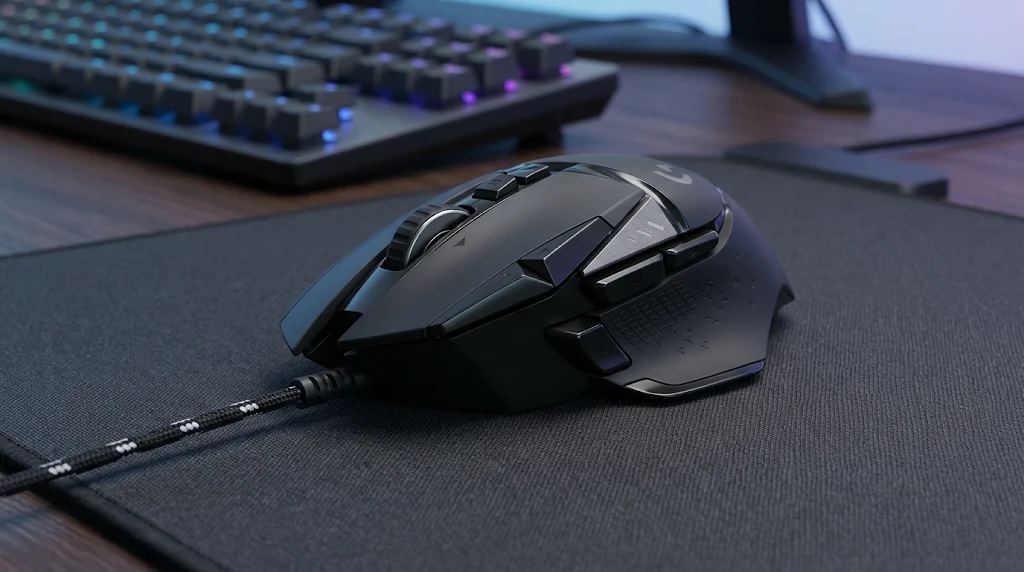
Choosing the right gaming mouse can make a noticeable difference to your computer experience. A good mouse should provide accurate tracking, responsive buttons, comfortable handling, and reliable performance. For gamers, these features can improve control during competitive matches, while everyday computer users can benefit from additional buttons and customization options.
The Logitech G502 X Gaming Mouse is designed for users who want a feature rich wired mouse with advanced sensor technology and several programmable controls. It belongs to Logitech’s popular G502 family and introduces a lighter design, updated switches, and improved customization features. Its combination of gaming focused hardware and practical controls makes it an interesting option for different types of PC users.
One of the main attractions of this mouse is its HERO 25K optical sensor. It also features LIGHTFORCE hybrid optical mechanical switches, a customizable DPI shift button, and a scroll wheel with multiple scrolling modes. These features are designed to provide precise movement and convenient control.
However, the G502 X is not the only model in its family. Logitech also offers wireless versions called the G502 X LIGHTSPEED and G502 X PLUS. Understanding their differences can help buyers select the right version for their needs. This guide explores the wired G502 X in detail, including its design, performance, features, advantages, limitations, and buying considerations.
Table of Contents
What Is the Logitech G502 X Gaming Mouse?
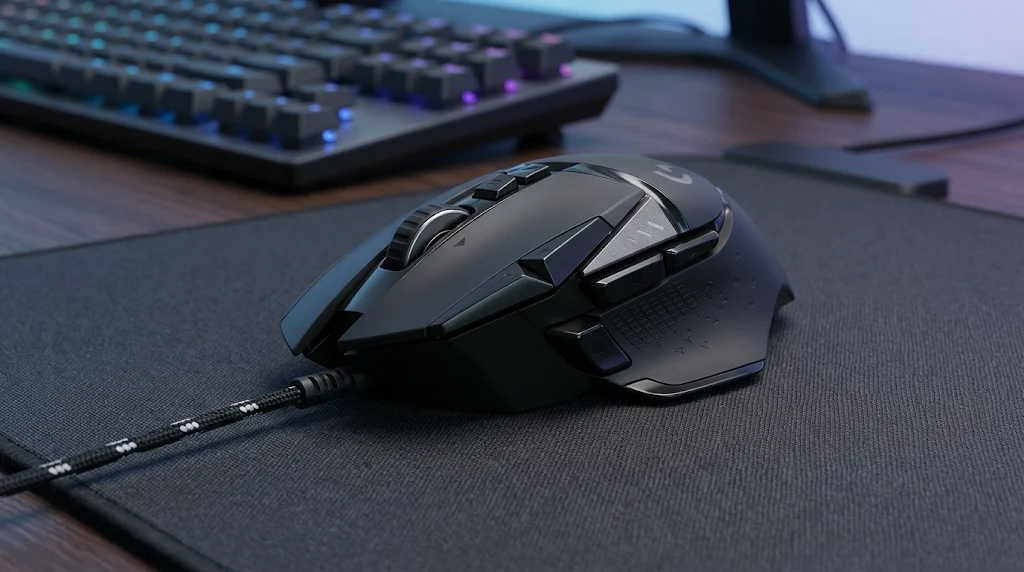
The Logitech G502 X is a wired gaming mouse developed for PC gamers and users who want more control over their computer activities. It is part of Logitech’s G502 series, which is known for its ergonomic design, programmable buttons, and gaming focused features.
The G502 X introduces several changes compared with older G502 models. Logitech redesigned the mouse to reduce its weight while maintaining its familiar shape. It also introduced LIGHTFORCE hybrid switches, which combine optical and mechanical technologies to provide responsive clicking with tactile feedback.
Another important feature is the HERO 25K sensor. This optical sensor supports a wide sensitivity range and is designed for accurate tracking. Users can adjust the DPI settings to match their preferred gaming style, screen resolution, and daily computer tasks.
Unlike the wireless versions, the standard G502 X connects through a USB cable. This means users do not need to charge a battery or replace wireless batteries. It is a practical option for people who prefer a direct wired connection and do not mind having a cable on their desk.
Design and Build Quality
Ergonomic Shape and Appearance
The Logitech G502 X has an ergonomic shape designed primarily for right handed users. Its body includes a thumb rest and several additional buttons positioned around the main controls. These features are intended to make the mouse comfortable to hold while providing convenient access to different functions.
Its design is recognizable but has been refined to create a lighter structure. The mouse is available in black and white versions, depending on the market and retailer. Both options have a modern appearance that can fit into different gaming desk setups.
The overall shape is suitable for people who enjoy having multiple controls within easy reach. However, it is important to remember that hand size and grip preference vary. Someone who prefers a simple symmetrical mouse may find the G502 X’s ergonomic shape less familiar.
Weight and Construction
Weight is an important consideration when selecting a gaming mouse. A heavy mouse may feel stable to some users, while a lighter model may make quick movements easier. Logitech redesigned the G502 X to reduce its weight to approximately 89 grams.
This is lighter than several older G502 models and gives the mouse a more modern feel. Its construction uses a combination of materials designed to balance durability and weight. The textured areas also help provide grip during regular use.
The mouse includes PTFE feet designed to support smooth movement across a compatible mouse pad. These feet help reduce friction and allow users to move the mouse comfortably. The overall build is intended to provide a combination of practical handling and gaming performance.
HERO 25K Sensor and Tracking Performance
Understanding the HERO 25K Sensor
The HERO 25K sensor is one of the most important components of the Logitech G502 X. It is an optical gaming sensor developed to provide accurate movement tracking. A reliable sensor helps users control cursor movement and maintain consistent aim in games.
The sensor supports a sensitivity range from 100 to 25,600 DPI. DPI stands for dots per inch and describes how far the cursor moves in relation to physical mouse movement. A higher DPI setting makes the cursor move farther with smaller hand movements, while a lower setting offers slower movement.
The best sensitivity depends on the user’s preferences. Some gamers prefer lower DPI settings because they want more control over small movements. Other users prefer higher settings because they work with large displays or want faster cursor movement.
Tracking Accuracy and Responsiveness
The HERO 25K sensor is designed to provide accurate tracking without unwanted smoothing, filtering, or acceleration under its specified operating conditions. This can be useful for gamers who want predictable mouse movement during different types of games.
Logitech lists a maximum tracking speed above 400 IPS and acceleration above 40G for the wired G502 X. These specifications describe the sensor’s tracking capabilities. They do not guarantee a particular result in every game because performance also depends on the surface, computer, software, and user settings.
The mouse also supports a report rate of up to 1000Hz, which corresponds to a one millisecond reporting interval. This allows the device to communicate its position frequently with a compatible computer. For gaming users, responsive tracking and consistent input can contribute to a more controlled experience.
LIGHTFORCE Hybrid Switch Technology
One of the standout features of the Logitech G502 X is its LIGHTFORCE hybrid optical mechanical switch technology. These switches combine optical actuation with mechanical components. The optical technology is designed to provide fast actuation, while the mechanical structure maintains a familiar tactile clicking experience.
Traditional mechanical switches rely on physical electrical contact to register clicks. Optical switches use light based detection to register activation. Logitech’s hybrid design aims to combine the advantages of both approaches in one switch system.
For gamers, click responsiveness can be important during competitive gameplay. Fast and consistent button activation may help users perform repeated actions comfortably. The LIGHTFORCE technology is designed to support this type of use while maintaining satisfying click feedback.
The switches also form part of the G502 X’s updated design compared with earlier G502 models. However, personal preference still matters. Some users enjoy crisp mechanical style feedback, while others prefer softer or quieter mouse clicks.
Buttons and Customization
Programmable Controls
The Logitech G502 X includes 11 physical buttons and supports 13 programmable controls. These controls provide additional flexibility compared with a basic two button mouse.
The additional buttons can be assigned to supported commands, shortcuts, and game actions through Logitech G HUB software. For example, users can configure side buttons for navigation or assign suitable commands for compatible games.
This flexibility can be especially useful for strategy games, role playing games, and other titles with several controls. Instead of relying entirely on keyboard shortcuts, users can move selected actions to the mouse.
However, more buttons are not automatically better for every person. Some gamers prefer a simple layout with only a few controls. The G502 X is most useful for people who actually want to customize their mouse and use its additional functions.
Adjustable DPI Shift Button
The DPI shift button is another useful feature. It allows users to temporarily change mouse sensitivity when they press it. This can be useful in games where different activities require different movement speeds.
For example, a user may prefer a normal sensitivity setting for general movement and a lower setting for more precise cursor control. The DPI shift function makes this adjustment accessible without opening software settings during every session.
Logitech also redesigned this button to make it reversible and removable. Users can adjust its position or replace it with the included button cover, depending on their preference. This helps make the mouse more adaptable to different hand positions.
Scroll Wheel and Navigation
The scroll wheel is an important part of the G502 X’s design. It supports two main scrolling modes: precise ratchet scrolling and hyper fast free spinning. Users can switch between these modes depending on the task.
Ratchet scrolling provides controlled movement, making it useful when browsing documents, websites, and menus. Hyper fast scrolling allows the wheel to move through long pages more quickly. This can be convenient when reading lengthy articles or navigating large documents.
The scroll wheel also supports left and right tilt inputs. These additional controls can be assigned to compatible functions through Logitech G HUB. For some users, this can make horizontal navigation and productivity tasks easier.
The combination of scrolling modes and tilt inputs makes the G502 X more versatile than a basic gaming mouse. It can be useful for both entertainment and everyday computer activities.
Gaming Performance
Performance in FPS Games
First person shooter games often require accurate tracking, responsive clicks, and consistent control. The Logitech G502 X provides a HERO 25K sensor, LIGHTFORCE switches, and adjustable DPI settings designed to support these requirements.
Its wired USB connection also means users do not need to manage wireless battery levels or connect a separate wireless receiver. The one millisecond report interval is designed to provide frequent input updates when used with a compatible computer.
The adjustable DPI shift button can be useful for players who want different sensitivity settings for different situations. However, the G502 X is not an extremely lightweight mouse compared with some specialized competitive gaming models. Players who strongly prefer ultra light designs should compare its weight with other options.
Strategy and MMO Games
The additional programmable controls make the G502 X suitable for many strategy and role playing games. These games can involve multiple commands, menus, and repeated actions. Having additional buttons can make selected controls easier to access.
Users can configure the side buttons and other supported controls according to their preferences. This may reduce the need to move between the mouse and keyboard for every action. The scroll wheel’s tilt functionality can also be useful for supported navigation tasks.
The mouse is not limited to one gaming genre. Its customizable layout can be adapted for different games, although the best configuration depends on the available in game controls and personal preferences.
Everyday Productivity
Although the G502 X is marketed as a gaming mouse, it can also be useful for everyday work. Its programmable controls can support shortcuts for browsing, document editing, and other applications.
The scroll wheel’s hyper fast mode can be helpful when navigating long documents or websites. Its tilt inputs can also provide additional navigation options when configured through compatible software.
People who spend many hours working at a computer may appreciate the extra controls. However, users who prefer a very simple mouse may find its button layout more complicated than necessary.
Comfort and Grip Styles
Comfort is one of the most personal parts of choosing a mouse. The Logitech G502 X has an ergonomic right handed design with a dedicated thumb rest. Its shape is intended to support a comfortable grip during gaming and regular computer use.
It may appeal to users who prefer a palm grip or a relaxed claw grip, depending on their hand size. The thumb rest provides an area for the thumb, while the additional buttons are positioned around the side of the mouse.
People with smaller hands should consider the dimensions before buying. The G502 X is not a tiny mouse, and its shape may feel large for users who prefer compact designs. Trying it in person can help determine whether its size and button positions are suitable.
The 89 gram weight also makes it important to consider personal preference. Some users may appreciate its balance between features and weight, while others may prefer a lighter mouse with fewer controls.
Logitech G HUB Software
Logitech G HUB is the company’s software for configuring compatible gaming devices. It allows users to customize supported mouse functions and manage settings through a computer application.
With the G502 X, users can configure DPI levels, assign supported button commands, and create different profiles. This can be useful for people who play different games or use different applications throughout the day.
The mouse also includes onboard memory. Logitech’s specifications list support for up to five onboard profiles, with the default configuration and software setup determining how profiles are managed. This allows users to store settings on the device for use on compatible computers.
G HUB is not necessary for basic mouse movement and clicking. However, users who want to take advantage of the programmable buttons and advanced customization options should consider installing the official software.
Logitech G502 X vs G502 X LIGHTSPEED vs G502 X PLUS
The G502 X family includes different versions designed for different preferences. The standard G502 X is a wired model, while the G502 X LIGHTSPEED and G502 X PLUS are wireless options.
The standard G502 X is suitable for users who prefer a direct USB connection and do not want to manage battery charging. The G502 X LIGHTSPEED offers wireless connectivity while maintaining many of the same core features. The G502 X PLUS adds LIGHTSYNC RGB lighting for users who want a more colorful gaming setup.
Although these versions share the same product family, they are not identical. Their weight, connectivity, lighting, and battery features differ. Buyers should check the exact model name before purchasing because retailer listings may sometimes use similar product titles.
| Feature | G502 X | G502 X LIGHTSPEED | G502 X PLUS |
|---|---|---|---|
| Connection | Wired USB | LIGHTSPEED wireless | LIGHTSPEED wireless |
| Sensor | HERO 25K | HERO 25K | HERO 25K |
| LIGHTFORCE Switches | Yes | Yes | Yes |
| Weight | 89 g | 102 g | 106 g |
| Programmable Controls | 13 | 13 | 13 |
| RGB Lighting | No | No | Yes |
| Battery | No battery required | Rechargeable | Rechargeable |
| Main Advantage | Simple wired connection | Wireless convenience | Wireless and RGB lighting |
| Best For | Wired gaming users | Wireless gaming users | Users who want wireless RGB features |
The table highlights the main differences between the three versions. The wired model is the lightest of these options and does not require charging. The wireless versions provide more freedom of movement, while the PLUS model adds customizable lighting.
There is no single best version for everyone. Users should decide whether a wired connection, wireless convenience, or RGB lighting matters most to them before choosing a model.
Advantages and Disadvantages
Main Advantages
The Logitech G502 X offers several useful features for people who want a customizable gaming mouse. Its HERO 25K sensor provides a broad DPI range, while LIGHTFORCE hybrid switches are designed for responsive clicking and tactile feedback.
Its 13 programmable controls provide flexibility across different games and applications. The adjustable DPI shift button and dual mode scroll wheel also add practical functionality. The wired connection means users do not need to charge a battery or manage wireless connectivity.
Another advantage is its lighter design compared with some previous G502 models. At approximately 89 grams, it provides a more manageable weight while retaining its additional buttons and ergonomic structure.
Main Disadvantages
The biggest limitation is that the standard G502 X is a wired mouse. Users who prefer a clean desk without cables may find the connection less convenient than a wireless alternative.
It also does not include RGB lighting. This may disappoint buyers who want customizable lighting effects across their gaming accessories. The G502 X PLUS is the more suitable option within the same family for users who specifically want LIGHTSYNC RGB.
The ergonomic shape and additional buttons may also take time to get used to. People with smaller hands or a preference for simple symmetrical mice may find another design more comfortable. Buyers should consider these limitations alongside the mouse’s technical features.
Who Should Consider the Logitech G502 X?
The Logitech G502 X is worth considering for PC gamers who want a wired mouse with several programmable controls. Its sensor, switches, and scroll wheel provide a feature set that can support different types of games and everyday activities.
It may be especially useful for users who play strategy games, role playing games, and titles that benefit from additional mouse commands. The customizable controls can also help people who want to create shortcuts for productivity applications.
It is also a reasonable option for people who prefer a wired connection and do not want to think about battery life. Because it does not require charging, users can simply connect it to a compatible USB port and use it.
However, people who want Bluetooth, wireless connectivity, RGB lighting, or an especially lightweight design should compare other models before making a decision.
What to Check Before Buying
Confirm the Exact Model
The G502 X family includes wired and wireless versions. Before placing an order, make sure the listing clearly identifies the standard G502 X rather than the G502 X LIGHTSPEED or G502 X PLUS.
This is important because the models have different connection types, weights, and lighting features. Reading the complete product description can help avoid confusion.
Check Compatibility and Software
The standard G502 X uses a USB connection and supports Logitech G HUB for customization. Buyers should make sure their computer has a compatible USB port and check the software’s current operating system requirements.
Basic mouse functions can work without advanced customization. However, users who want to configure buttons and profiles should check that G HUB is supported on their system.
Compare Price and Warranty
Prices can vary depending on the retailer, location, product availability, and promotional offers. Buyers in Pakistan should compare reputable local computer stores and online sellers before making a purchase.
Warranty support is also important. Check whether the product is new, refurbished, or used, and confirm what warranty coverage the seller provides. A reliable seller and clear return policy can be more valuable than choosing the cheapest listing.
Latest Update and Product Considerations
The G502 X continues the G502 series with a redesigned body, LIGHTFORCE hybrid switches, and a HERO 25K sensor. Its main features make it a recognizable option for people looking for a customizable wired gaming mouse.
The wireless G502 X models have separate features, including rechargeable batteries and LIGHTSPEED connectivity. Logitech has also introduced updated product information for parts of the G502 X family, so buyers should check the official product page for the exact version they are considering.
It is especially important not to confuse specifications between the wired and wireless versions. For example, battery life applies to wireless models, while the standard wired G502 X does not need a battery. Checking the exact model number and official specifications can help buyers make an informed decision.
Frequently Asked Questions
Is the Logitech G502 X a good gaming mouse?
The Logitech G502 X is a feature rich wired gaming mouse with a HERO 25K sensor, LIGHTFORCE hybrid switches, and programmable controls. It can be a good option for users who want customization and a wired connection. Whether it is the right choice depends on hand comfort, gaming preferences, and budget.
What is the maximum DPI of the Logitech G502 X?
The standard G502 X supports a sensitivity range from 100 to 25,600 DPI. Users can adjust the sensitivity to match their preferences and the requirements of different games. A higher DPI setting is not automatically better, because the ideal setting depends on how someone uses the mouse.
Does the Logitech G502 X have RGB lighting?
No. The standard wired G502 X does not include RGB lighting. Users who want customizable LIGHTSYNC RGB lighting can consider the G502 X PLUS wireless model instead.
Is the Logitech G502 X wireless?
The standard G502 X is a wired mouse that connects through USB. Logitech also offers the G502 X LIGHTSPEED and G502 X PLUS, which are wireless versions. Buyers should check the complete model name before purchasing.
How many programmable buttons does the Logitech G502 X have?
The G502 X includes 11 physical buttons and supports 13 programmable controls. Users can customize supported functions through Logitech G HUB software. This makes the mouse useful for games and applications that benefit from additional shortcuts.
What is LIGHTFORCE technology?
LIGHTFORCE is Logitech’s hybrid optical mechanical switch technology. It combines optical actuation with mechanical components to provide responsive activation and tactile feedback. It is one of the key design features introduced with the G502 X series.
Is the Logitech G502 X suitable for everyday work?
Yes. The mouse can be used for browsing, document editing, office applications, and other everyday activities. Its programmable buttons and dual mode scroll wheel can provide additional convenience beyond gaming.
What is the difference between the G502 X and G502 X PLUS?
The standard G502 X is a wired mouse without RGB lighting. The G502 X PLUS is a wireless model with LIGHTSPEED connectivity, rechargeable battery, and LIGHTSYNC RGB lighting. Their weight and power requirements are also different.
Conclusion
The Logitech G502 X Gaming Mouse combines a modern sensor, responsive switches, programmable controls, and an ergonomic design. Its HERO 25K sensor supports adjustable sensitivity, while LIGHTFORCE hybrid switches are designed to provide fast actuation and tactile feedback. The dual mode scroll wheel and customizable DPI shift button add further flexibility.
You may also find this blog on below website :
Try Our free tools :

Muhammad khubaib
Gaming editor and browser game strategist at PlayStrom.
📖 Related Blog Articles
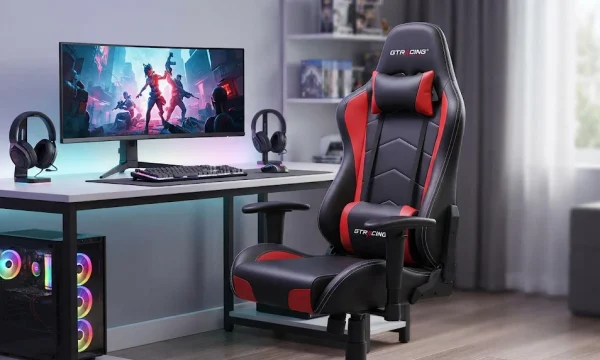
GTRACING Gaming Chair: Features, Comfort, Models, Pros, Cons, and Buying Guide
A gaming chair should support your posture, fit your desk, and remain comfortable during long gaming sessions. The GTRACING gaming chair offers…

Best PS5 Games: Top Games Worth Playing in 2026
Finding the best PS5 games is easier when you know what kind of experience you actually want. From creative adventures and competitive…
Will GTA 6 Be on PC? Release Date, Rumours and Latest News
Many gamers are asking: will GTA 6 be on PC? While a PC version is reportedly planned, Rockstar Games has not officially…
Related & Recommended Games

2048 Neon Edition
2048 Neon Edition is a custom-coded sliding tile puzzle game built from scratch using HTML5 and Vanilla JS.

Neon Snake Arcade
Neon Snake Arcade is a custom free web browser snake game built natively with HTML5 canvas and responsive touch controls.

2048 Puzzle Web
2048 is a free daily sliding block puzzle browser game where players slide numbered tiles to merge them into 2048.