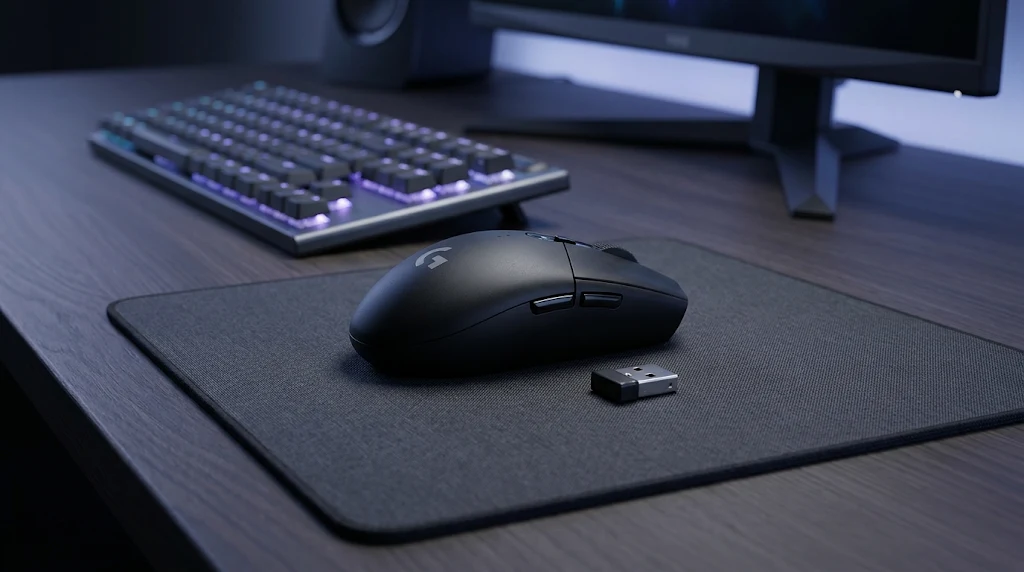
Choosing the right gaming mouse can improve the way you play games and use your computer. A good mouse should offer accurate tracking, responsive buttons, comfortable handling, and a reliable connection. Wireless gaming mice are especially popular because they provide a clean desk setup without the restrictions of a cable. However, some wireless models can be expensive, making budget friendly options attractive to many gamers.
The Logitech G305 LIGHTSPEED Wireless Gaming Mouse is a well known option for people who want wireless gaming performance without purchasing an expensive premium mouse. It combines Logitech’s HERO optical sensor, LIGHTSPEED wireless technology, six programmable buttons, and a replaceable AA battery. Its compact design also makes it easy to carry between different locations.
The G305 is designed for gaming, but it can also handle everyday computer activities such as browsing, studying, office work, and general productivity. It has several useful features, although it also makes some compromises compared with newer rechargeable wireless mice. This guide explores its design, sensor, battery life, gaming performance, advantages, disadvantages, and important buying considerations.
Table of Contents
What Is the Logitech G305 LIGHTSPEED Wireless Gaming Mouse?
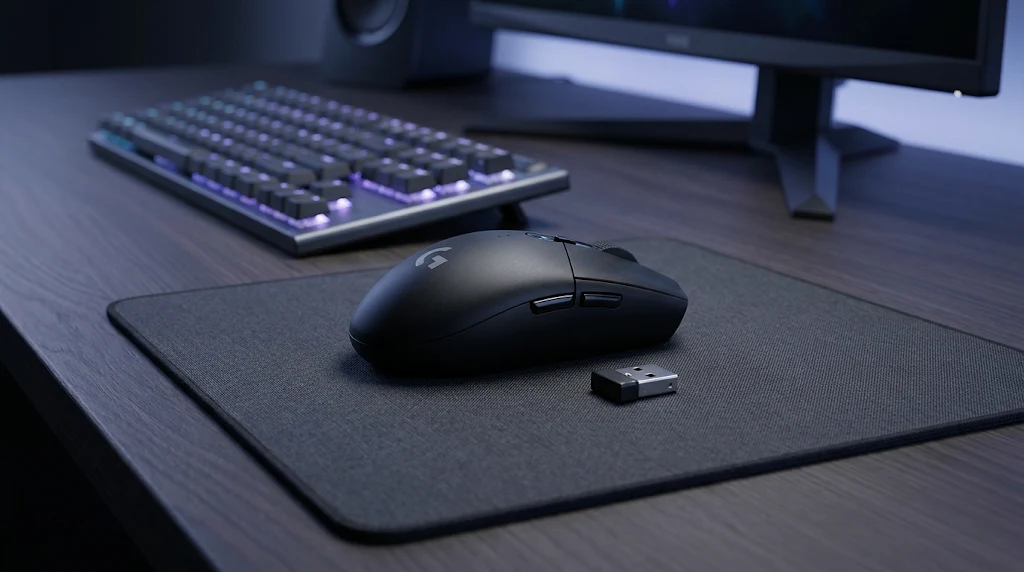
The Logitech G305 LIGHTSPEED is a wireless gaming mouse designed for PC users who want responsive tracking and a reliable wireless connection. It uses Logitech’s HERO optical sensor to track mouse movement and the company’s LIGHTSPEED 2.4GHz wireless technology to communicate with a computer through a small USB receiver.
One of its main attractions is that it provides gaming focused features in a relatively simple design. Instead of including unnecessary lighting effects or complicated controls, the mouse focuses on the features that matter during regular computer use and gaming. Its six programmable buttons give users additional control, while its adjustable DPI settings make it possible to change cursor sensitivity.
The mouse uses one replaceable AA battery instead of a built in rechargeable battery. Logitech advertises up to 250 hours of continuous use in Performance mode, although actual battery life depends on usage and battery conditions. This design allows users to replace the battery instead of waiting for the mouse to recharge.
Design and Build Quality
Shape, Size, and Weight
The Logitech G305 has a compact, nearly symmetrical shape with two side buttons positioned on the left side. Its dimensions are approximately 116.6mm in length, 62.15mm in width, and 38.2mm in height. This relatively small design makes it convenient for users who prefer a compact mouse or regularly travel with their computer accessories.
The mouse weighs approximately 75 grams without its battery and around 99 grams with a standard AA battery. This is important because the battery adds noticeable weight compared with some modern lightweight gaming mice. Users who prefer extremely light devices may notice the difference, particularly during long gaming sessions that involve frequent mouse movement.
Color Options and Appearance
Another interesting feature of the G305 is its simple appearance and selection of color options. Depending on the market and available stock, buyers may find versions in colors such as black, white, blue, lilac, and mint. Availability can vary by region, so checking local listings is recommended.
The design does not include RGB lighting. Some gamers may consider this a disadvantage because colorful lighting has become common in gaming accessories. However, the simple appearance may appeal to users who prefer a clean desk setup without additional lighting effects. Its understated design also makes it suitable for school, office, and home environments.
HERO Sensor and Tracking Performance
Understanding the HERO Optical Sensor
The HERO sensor is one of the most important features of the Logitech G305. It is designed to provide accurate tracking while using power efficiently. Reliable tracking matters in gaming because even small changes in cursor movement can affect aiming, navigation, and control.
Logitech specifies a sensitivity range from 200 to 12,000 DPI for the G305. DPI, or dots per inch, describes how far the cursor moves in relation to physical mouse movement. A higher DPI setting makes the cursor move farther with smaller hand movements, while a lower setting provides slower and more controlled movement.
The right DPI setting depends on personal preference, screen resolution, game type, and playing style. A user who enjoys precise aiming may prefer a lower sensitivity, while someone who works across a large display may prefer a higher setting. There is no single DPI value that works best for everyone.
Tracking Accuracy and Responsiveness
Accurate tracking helps users control movement consistently. The G305’s HERO sensor is designed to track movement without unwanted smoothing, acceleration, or filtering under its specified operating conditions. This makes it suitable for many gaming situations where predictable movement is important.
The mouse also supports a maximum tracking speed of 400 IPS and acceleration of up to 40G according to Logitech’s specifications. These figures describe the sensor’s tracking capabilities, rather than guaranteeing a particular gaming result. Actual performance also depends on the surface, computer, game settings, and the user’s control.
LIGHTSPEED Wireless Technology
Reliable Wireless Connection
Wireless performance is an important consideration when choosing a gaming mouse. Some users worry that a wireless device may feel less responsive than a wired mouse. Logitech’s LIGHTSPEED technology is designed to provide a fast wireless connection for gaming through a dedicated 2.4GHz USB receiver.
The G305 supports a 1ms report rate, equivalent to a 1000Hz reporting rate. This means the mouse can report its position to the computer at frequent intervals. It is designed to provide a responsive experience for compatible PC games and everyday computer activities.
A stable connection also depends on the environment. Keeping the receiver reasonably close to the mouse and avoiding unnecessary wireless interference can help maintain a reliable connection. Logitech includes a small USB receiver that connects directly to a compatible computer.
USB Receiver and Compatibility
The G305 uses a USB receiver rather than Bluetooth. This is an important difference for people who regularly connect accessories to laptops, tablets, or other devices. A computer needs a compatible USB port, or an appropriate adapter, to use the mouse.
The absence of Bluetooth may not be a problem for desktop PC gamers who have an available USB port. However, people who switch between several devices may prefer a mouse that supports multiple connection methods. Buyers should check their computer’s available ports before purchasing.
Battery Life and Power Management
Replaceable AA Battery
The Logitech G305 uses one AA battery for power. Logitech advertises up to 250 hours of continuous use in Performance mode. The company also lists an Endurance mode that can provide up to nine months of standard usage, depending on usage conditions.
One advantage of a replaceable battery is that users can install another battery when the current one runs out. They do not need to connect a charging cable or wait for an internal battery to recharge. This can be convenient for people who prefer replaceable batteries.
However, this design also has a disadvantage. Users need to keep spare batteries available, and the mouse cannot be charged through a USB cable. Some competing wireless gaming mice use built in rechargeable batteries, which may be more convenient for people who prefer charging their accessories.
Battery Indicators and Power Settings
The G305 includes an indicator that helps users understand when the battery needs attention. Its power switch also allows users to turn the mouse off when it is not being used. These simple controls can help manage battery consumption.
Battery life is not exactly the same for every user. It can change depending on the battery brand, battery condition, usage pattern, and selected operating mode. For the best experience, users should check the battery indicator regularly and use a suitable replacement battery when necessary.
Buttons, Scroll Wheel, and Customization
Six Programmable Buttons
The Logitech G305 includes six buttons: left click, right click, a clickable scroll wheel, two side buttons, and a dedicated DPI button. This layout provides the basic controls needed for most computer activities and many gaming genres.
The side buttons can be useful for browser navigation, game commands, and other shortcuts. For example, a player may assign supported actions to the side buttons instead of using keyboard combinations. This can make certain tasks easier, although the best button arrangement depends on the game and personal preference.
Logitech G HUB Software
Logitech G HUB is the company’s software for customizing supported gaming devices. With compatible software settings, users can adjust DPI levels, configure supported button functions, and manage profiles. The G305 also includes onboard memory for one hardware profile.
This can be useful for people who want their preferred settings available when using the mouse on another compatible computer. Advanced button settings require the appropriate software, while basic mouse functions can be used without extensive customization.
The software is optional for basic operation, but it can help users make better use of the mouse’s programmable features. Users should download it from Logitech’s official website and check the current system requirements before installation.
Gaming Performance
Performance in First Person Shooter Games
First person shooter games often require accurate movement, responsive clicks, and consistent tracking. The Logitech G305 offers a HERO sensor and LIGHTSPEED wireless connection designed to support these requirements. Its adjustable DPI settings also allow players to choose a sensitivity that matches their preferences.
The mouse’s compact shape may suit users who prefer a smaller gaming mouse. Its two side buttons can also provide quick access to selected commands. However, comfort is personal, and players with larger hands may want to check its dimensions before buying.
Adventure, Racing, and Casual Games
The G305 is not limited to competitive gaming. It can also be used for adventure games, strategy titles, casual games, and many other PC experiences. Its programmable buttons can provide convenient shortcuts, while the optical sensor supports accurate movement across compatible surfaces.
For casual gaming, its features may be more than enough for many users. It can also be used for everyday computer tasks between gaming sessions. This makes it a flexible accessory for someone who wants one mouse for different activities rather than purchasing separate devices.
Everyday Work and Productivity
A gaming mouse can also be useful outside gaming. The G305 supports regular activities such as browsing websites, managing documents, attending online classes, and using productivity applications. Its wireless design helps keep a desk free from an additional cable.
Its compact dimensions can also make it easier to carry in a laptop bag. However, users who work with many horizontal scrolling tasks or need additional side controls may prefer a mouse with more specialized productivity features. The G305 is primarily designed as a gaming mouse, so its feature set is relatively simple.
Comfort and Grip Styles
Comfort is an important part of choosing a gaming mouse. The G305 has a compact, nearly symmetrical shape, but its side buttons are positioned on the left side. Its design can work for different grip preferences, although individual hand size and grip style affect how comfortable it feels.
Users who prefer a claw grip or fingertip grip may find the compact shape suitable. Palm grip users should pay particular attention to the mouse’s dimensions, especially if they have larger hands. A mouse that feels comfortable during a short test may feel different during a longer gaming session.
Weight is another factor to consider. At approximately 99 grams with a standard AA battery, the G305 is not among the lightest gaming mice available today. Some users may appreciate its solid feel, while others may prefer a lighter model for fast movements. Trying the mouse in person, when possible, is a helpful way to judge its comfort.
Reviews: Strengths and Weaknesses
What Reviewers Like
Professional reviews commonly highlight the G305’s reliable sensor performance, solid construction, and responsive wireless connection. RTINGS notes its strong performance for FPS gaming and its good build quality, while Tom’s Hardware also highlights its sensor and wireless reliability. These qualities help explain why the mouse has remained a recognizable option in the wireless gaming category.
Another advantage is its relatively straightforward design. It provides six programmable buttons, adjustable sensitivity, and a dedicated wireless receiver without adding complicated features. For users who want a simple gaming mouse, this can be a practical combination.
What Reviewers Criticize
The most common limitations are its replaceable AA battery, lack of Bluetooth, and compact shape. Some reviewers also point out that the mouse feels relatively heavy compared with newer lightweight gaming models. These limitations do not make it unsuitable, but they are important when comparing it with modern alternatives.
The scroll wheel also lacks left and right tilt inputs and a free scrolling mode. Users who need advanced productivity controls may find this limiting. In addition, the mouse does not have RGB lighting, so buyers looking for customizable lighting effects may prefer another model.
Logitech G305 LIGHTSPEED Comparison Table
The following table compares the G305 with two broad mouse categories. These are general product category comparisons, not claims about a particular competing model.
| Feature | Logitech G305 LIGHTSPEED | Typical Wired Gaming Mouse | Typical Rechargeable Wireless Mouse |
|---|---|---|---|
| Connection | 2.4GHz USB receiver | USB cable | Wireless receiver or Bluetooth, depending on model |
| Sensor | HERO optical | Varies by model | Varies by model |
| Maximum DPI | 12,000 | Varies by model | Varies by model |
| Report Rate | Up to 1000Hz | Varies by model | Varies by model |
| Battery | One AA battery | No battery required | Built-in rechargeable battery |
| RGB Lighting | No | Depends on model | Depends on model |
| Programmable Buttons | Six | Depends on model | Depends on model |
| Cable | No cable during use | Attached cable | No cable during wireless use |
| Main Advantage | Wireless performance and replaceable battery | No battery replacement or charging | Rechargeable power and wireless convenience |
| Main Limitation | No Bluetooth or built-in charging | Cable management | Requires periodic charging |
The comparison shows that the G305 is designed for people who want a dedicated wireless gaming connection and do not mind using a replaceable battery. A wired mouse may be more suitable for someone who prefers not to manage batteries, while a rechargeable wireless mouse may appeal to people who want built in charging.
The best option depends on your priorities. Consider connection type, weight, comfort, battery design, sensor performance, and price before choosing a gaming mouse. Specifications can vary significantly between models, so always check the official product information for the exact mouse you are comparing.
Who Should Consider the Logitech G305?
The Logitech G305 may be a good option for PC gamers who want a compact wireless mouse with a dedicated USB receiver. Its HERO sensor, adjustable DPI, and programmable buttons make it suitable for several gaming styles. It can also be useful for people who want a wireless mouse for both gaming and everyday computer use.
Students and laptop users may appreciate its portable size and cable free design. The replaceable AA battery can also be convenient for someone who prefers swapping batteries rather than charging an accessory. Its simple appearance may appeal to users who do not need RGB lighting.
However, it may not be the best match for everyone. Users who need Bluetooth, a rechargeable battery, an extremely lightweight design, or a larger ergonomic shape should compare other options. People with larger hands should pay particular attention to its dimensions and grip comfort.
What to Check Before Buying
Check the Exact Model and Seller
Before purchasing, confirm that the product is the Logitech G305 LIGHTSPEED Wireless Gaming Mouse and not a different model with a similar name. Check the packaging, product description, included USB receiver, and warranty details. Buying from a reliable seller can help reduce the risk of receiving an incorrect or counterfeit product.
It is also useful to check whether the mouse is new, refurbished, or used. Product condition can affect the price and available warranty. Buyers should read the seller’s return policy and confirm what is included in the box before completing a purchase.
Compare Local Prices and Availability
The price of the Logitech G305 can change depending on the country, retailer, color, stock, and promotional offers. There is no single price that applies to every market. Buyers in Pakistan should compare prices from reputable local computer stores and online retailers while checking warranty coverage and return conditions.
Avoid choosing a seller based only on the lowest advertised price. A reliable seller, clear product information, and valid warranty support can be more valuable than a small price difference. It is also worth checking the cost and availability of suitable AA replacement batteries.
Check Your Computer’s USB Ports
Because the G305 uses a USB receiver, users need a compatible USB connection. People with modern laptops that only have USB-C ports may need a suitable adapter. Checking this before buying can prevent connection problems later.
The mouse does not support Bluetooth, so it cannot connect through Bluetooth alone. If you regularly use a tablet or a laptop without a compatible USB port, a Bluetooth enabled mouse may be a better choice.
Latest Update and Buying Considerations
The Logitech G305 remains a recognizable wireless gaming mouse, but buyers should remember that the gaming accessory market continues to change. Newer mice may offer rechargeable batteries, lighter construction, additional connection options, or more advanced customization. This makes it important to compare the G305 with current alternatives rather than relying only on its original reputation.
When checking current listings, focus on the exact specifications and condition of the product. Confirm whether the seller provides the original receiver, battery, documentation, and warranty. Also check whether the listed color and model match the product you want.
The G305 can still make sense when its price and feature set match your needs. Its HERO sensor and LIGHTSPEED connection remain its main attractions, while the AA battery and lack of Bluetooth are the trade offs buyers should understand.
Frequently Asked Questions
What is the maximum DPI of the Logitech G305?
The Logitech G305 supports adjustable sensitivity from 200 to 12,000 DPI. Users can select a suitable setting based on their gaming preferences, screen size, and cursor control needs. A higher DPI is not automatically better, because the ideal setting depends on the individual user and the game being played.
Is the Logitech G305 a wireless gaming mouse?
Yes. The G305 is a wireless gaming mouse that uses Logitech LIGHTSPEED 2.4GHz technology and a dedicated USB receiver. It does not require a cable during normal wireless use, but the computer needs a compatible USB port to connect the receiver.
How long does the Logitech G305 battery last?
Logitech advertises up to 250 hours of continuous use in Performance mode with one AA battery. Its Endurance mode is listed as providing up to nine months of standard usage. Actual battery life can vary depending on usage, battery quality, and operating conditions.
Does the Logitech G305 support Bluetooth?
No. The G305 uses a dedicated 2.4GHz USB receiver and does not include Bluetooth connectivity. Users who need Bluetooth support should consider a different mouse that offers that connection option.
Is the Logitech G305 suitable for FPS games?
The G305 can be suitable for many FPS games because it offers a HERO optical sensor, adjustable DPI, and LIGHTSPEED wireless technology. Its performance is designed to provide accurate tracking and responsive control. However, comfort and suitability depend on hand size, grip style, and personal preference.
Does the Logitech G305 have RGB lighting?
No. The standard Logitech G305 does not include RGB lighting. It has a simple design that focuses on gaming performance and battery efficiency rather than customizable lighting effects.
Can I use the Logitech G305 for everyday work?
Yes. The G305 can be used for browsing, document editing, online learning, office applications, and other everyday computer activities. Its wireless connection and compact design make it useful beyond gaming, although users who need specialized productivity features may prefer another mouse.
Is the Logitech G305 worth buying?
The G305 may be worth considering if you want a compact wireless gaming mouse with a HERO sensor and a dedicated 2.4GHz connection. Before buying, compare its price with newer alternatives and consider whether its AA battery, lack of Bluetooth, and weight match your preferences.
Conclusion
The Logitech G305 LIGHTSPEED Wireless Gaming Mouse offers a useful combination of wireless connectivity, accurate tracking, and straightforward gaming features. Its HERO optical sensor, adjustable DPI range, six programmable buttons, and LIGHTSPEED connection make it a practical option for many PC gamers. It can also handle everyday computer tasks, making it a flexible accessory for home, school, and office use.
You may also find this blog on below website :
Try Our free tools :

Muhammad khubaib
Gaming editor and browser game strategist at PlayStrom.
📖 Related Blog Articles
GTRACING Gaming Chair: Features, Comfort, Models, Pros, Cons, and Buying Guide
A gaming chair should support your posture, fit your desk, and remain comfortable during long gaming sessions. The GTRACING gaming chair offers…

Best PS5 Games: Top Games Worth Playing in 2026
Finding the best PS5 games is easier when you know what kind of experience you actually want. From creative adventures and competitive…

Will GTA 6 Be on PC? Release Date, Rumours and Latest News
Many gamers are asking: will GTA 6 be on PC? While a PC version is reportedly planned, Rockstar Games has not officially…
Related & Recommended Games

2048 Neon Edition
2048 Neon Edition is a custom-coded sliding tile puzzle game built from scratch using HTML5 and Vanilla JS.

Neon Snake Arcade
Neon Snake Arcade is a custom free web browser snake game built natively with HTML5 canvas and responsive touch controls.

2048 Puzzle Web
2048 is a free daily sliding block puzzle browser game where players slide numbered tiles to merge them into 2048.