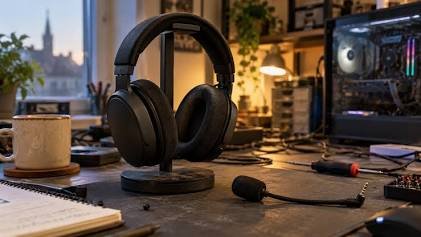
The 4Gamers Panther Premium Gaming Headset is a gaming-focused headset designed for players who want audio and voice communication in one convenient accessory. Its intended use includes gaming, chatting with teammates, listening to music, and enjoying other entertainment through compatible devices.
The Panther name is associated with a gaming-oriented design rather than a professional studio headset. That means buyers should focus on practical gaming performance instead of expecting advanced audio equipment designed for music production.
A headset in this category needs to handle several everyday tasks. You should be able to hear gameplay clearly, communicate without constantly adjusting your microphone, and wear it for a reasonable gaming session without excessive pressure.
Table of Contents
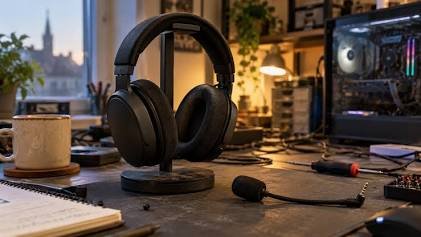
4Gamers Panther Premium Gaming Headset Specifications
Exact specifications can vary depending on the product version and retailer listing. Check the packaging and product description before purchasing to confirm the details of your particular headset.
| Feature | Details |
|---|---|
| Product name | 4Gamers Panther Premium Gaming Headset |
| Product category | Gaming headset |
| Audio | Stereo gaming audio |
| Microphone | Integrated gaming microphone |
| Design | Over-ear gaming-style headset |
| Connectivity | Verify the exact model’s connector |
| Controls | Model-dependent audio controls |
| Intended use | Gaming, voice chat, and entertainment |
| Compatibility | Depends on connection type and device support |
Do not assume every version has identical connectivity or control features. Confirm whether the model uses a standard 3.5 mm connection, USB, or another connector before ordering.
Sound Quality: What Should You Expect?
Sound quality determines how enjoyable a headset feels during everyday gaming. A good gaming headset should deliver understandable dialogue, balanced sound effects, and audio that does not become unpleasant at normal listening levels.
Gaming Audio and Sound Effects
In action games, sound effects help you understand what’s happening around you. Footsteps, environmental sounds, weapon effects, music, and dialogue all contribute to the gameplay experience.
The Panther Premium headset is intended for gaming use, so its sound presentation should be evaluated around practical gaming needs rather than audiophile-level music reproduction.
For casual gaming, stereo audio can provide a useful left-and-right sound distinction. This helps you identify whether an audio effect is coming from one side or the other.
However, stereo audio is not automatically equivalent to advanced virtual surround sound. A headset’s positioning accuracy depends on its drivers, the game’s audio design, and any supported audio processing.
Is It Good for Competitive Gaming?
For competitive games, clear audio matters more than simply having powerful bass.
A headset should allow you to hear important sound cues without music or explosions overpowering quieter sounds. If the sound is excessively bass-heavy, subtle environmental audio may become harder to notice.
Players should also consider their platform’s audio settings. Proper game audio configuration can make a noticeable difference, even when using an affordable headset.
The Panther may be suitable for casual multiplayer gaming, but competitive players should compare its sound clarity and positional accuracy with other headsets in the same price range before making a decision.
Microphone Performance and Voice Chat
A gaming headset microphone needs to capture your voice clearly without making teammates struggle to understand you.
The microphone is particularly important in multiplayer games where communication helps coordinate objectives, share information, and plan strategies.
Voice Clarity
For everyday party chats, a basic gaming microphone can be sufficient if it captures speech at a consistent volume and does not produce excessive background noise.
Your environment also matters. A loud fan, television, or nearby conversation can affect microphone quality, even when the headset itself performs reasonably well.
Position the microphone close enough to your mouth for clear speech, but avoid placing it directly in front of your breathing. If the microphone has an adjustable boom, experiment with its position until your voice sounds natural.
Microphone Limitations
An entry-level gaming headset is not designed to replace a dedicated recording microphone.
You should not expect professional podcast-quality recording, studio voice capture, or advanced noise cancellation unless the manufacturer specifically advertises those features.
For gaming, the practical test is simple: can your teammates understand your voice without repeatedly asking you to speak louder?
Comfort and Design
Comfort can make the difference between enjoying a headset and taking it off after a short session.
The Panther Premium’s gaming-style design is intended to provide an over-ear listening experience. However, comfort depends on earcup dimensions, padding material, headband adjustment, headset weight, and how tightly the headset sits against your head.
Earcup Comfort
The earcups should fit around your ears without pressing directly against them. If the cushions are too small, your ears may touch the internal surfaces, causing discomfort over time.
Padding also affects heat buildup. Soft cushions can feel comfortable initially, but warm materials may become less pleasant during longer sessions, especially in rooms without air conditioning.
If possible, try the headset before purchasing. Even a few minutes of wearing it can help you determine whether the headband pressure and earcup fit feel suitable.
Headband Adjustment
A properly adjusted headband distributes the headset’s weight across your head rather than concentrating pressure in one area.
Adjust both sides evenly. The headset should remain stable when you move your head, but it should not feel excessively tight.
A comfortable fit also helps maintain consistent audio positioning. If the earcups move around, the sound may change slightly depending on their position.
Connectivity and Device Compatibility
Compatibility is an important buying consideration because gaming headsets do not necessarily work identically across every platform.
Compatibility With Gaming Consoles
Depending on its connector and supported audio configuration, the headset may work with compatible gaming consoles through a controller or audio port.
Before purchasing, check:
- Whether your console supports the headset’s connector.
- Whether the microphone works through that connection.
- Whether separate audio controls are supported.
- Whether any additional adapter is required.
Some headsets provide audio through a standard connection but have limited functionality on certain devices.
Compatibility With PC
PC gaming setups may offer several connection options, depending on the computer’s audio ports and headset connector.
If your PC has separate headphone and microphone ports but the headset uses a combined connector, you may need a compatible splitter. Conversely, computers with a combined headset port may support a compatible single connector directly.
Check your computer’s available ports before ordering.
Compatibility With Mobile Devices
A compatible headset connector may also allow use with phones, tablets, and other devices.
However, some newer phones lack a traditional headphone jack. You may need an appropriate adapter, and microphone support can vary depending on the adapter and device.
Do not assume the headset will work with every smartphone without additional accessories.
Gaming Headset Controls and Everyday Usability
Headset controls should be easy to reach without interrupting gameplay. Depending on the exact Panther version, available controls may include volume adjustment or microphone-related functions.
Volume Adjustment
Quick volume access is useful when switching between games, party chat, and other entertainment. You should not need to leave a match just to reduce loud audio.
Keep the volume at a comfortable level. Turning game audio excessively high does not improve competitive performance and can expose your ears to harmful sound levels.
Microphone Control
A microphone mute function can be useful when talking to someone nearby or taking a short break from voice chat.
If your particular version includes a mute control, learn where it is positioned before playing. Controls that are difficult to locate can become annoying during active gameplay.
4Gamers Panther Premium Gaming Headset Pros and Cons
Every gaming accessory has trade-offs. An affordable headset may provide the essential features while leaving out premium materials, advanced audio processing, or additional connectivity.
Pros
- Gaming-focused headset design.
- Combines headphones and microphone in one accessory.
- Convenient for multiplayer communication.
- Potentially suitable for casual gaming and entertainment.
- Easier setup than separate audio equipment when using a compatible connection.
- Can be a practical option for players with limited accessory budgets.
Cons
- Exact specifications may differ between versions.
- Microphone performance may not match dedicated microphones.
- Stereo audio does not guarantee advanced surround sound.
- Comfort depends on earcup size and padding.
- Compatibility may require an adapter.
- Premium audio features should not be assumed without confirmation.
4Gamers Panther Premium vs Other Gaming Headsets
When comparing the Panther Premium with other gaming headsets, focus on the features you actually use rather than the product name or appearance.
| Feature | Panther Premium | Basic Gaming Headset | Premium Gaming Headset |
|---|---|---|---|
| Gaming audio | Standard gaming audio | Basic stereo | May include advanced processing |
| Microphone | Integrated | Integrated | Often improved microphone |
| Comfort | Depends on fit | Basic padding | May offer improved materials |
| Connectivity | Model-dependent | Usually basic | May offer multiple connections |
| Controls | Version-dependent | Limited | More extensive controls |
| Price category | Check retailer | Budget | Higher-priced |
| Best use | Everyday gaming | Casual gaming | Extended or feature-rich gaming |
The comparison is general rather than a direct benchmark of tested products. Actual sound quality, comfort, and features depend on the specific models being compared.
Should You Choose a More Expensive Headset?
A more expensive headset may offer stronger microphone performance, better padding, additional connectivity, improved software controls, or more advanced audio features.
But higher price does not guarantee a better fit for every gamer.
If you mostly play casual games and chat with friends, a basic headset may provide everything you need. If you play competitive multiplayer games frequently, microphone clarity and accurate sound positioning deserve more attention.
Is the 4Gamers Panther Premium Gaming Headset Worth Buying?
The 4Gamers Panther Premium Gaming Headset may be worth considering if you want a straightforward gaming headset for everyday entertainment and multiplayer communication.
Its value depends on the price, confirmed specifications, comfort, and compatibility with your gaming device.
Who Should Consider It?
This headset may suit:
- Casual console gamers.
- Players who regularly use party chat.
- Gamers looking for a combined headphone and microphone accessory.
- Buyers who prefer a simple gaming setup.
- Players who do not require advanced audio software.
Who Should Consider Alternatives?
Compare other models if you:
- Play competitive games where precise sound positioning matters.
- Need a microphone for streaming or recording.
- Prefer wireless connectivity.
- Want advanced surround sound features.
- Need particularly breathable ear cushions.
- Require compatibility across several different devices.
Before purchasing, compare the headset with other models available at a similar price. Pay attention to the warranty, return policy, and whether the product is new and genuine.
Tips for Getting the Best Performance
A few simple adjustments can improve your experience with almost any gaming headset.
Adjust Your Audio Settings
Set the game volume to a comfortable level and balance dialogue, music, and sound effects according to your preferences.
If the game provides audio presets, test them instead of assuming the default settings are ideal.
Position the Microphone Correctly
Keep the microphone at a reasonable distance from your mouth. Avoid touching it while speaking, as movement can introduce unwanted noise.
If your game or chat application includes microphone sensitivity settings, adjust them so normal speech is captured without constantly picking up background sounds.
Take Regular Breaks
Headsets can become uncomfortable during extended use. Take breaks, remove the headset occasionally, and allow your ears to rest.
If the earcups become warm, wiping away moisture and allowing the cushions to dry can help maintain comfort.
Store It Properly
Avoid pulling the cable sharply or wrapping it tightly around the headset. Store it somewhere clean and dry, away from direct sunlight and unnecessary pressure.
Basic care helps protect the cushions, cable, microphone, and adjustment mechanisms from avoidable wear.
Frequently Asked Questions About 4Gamers Panther Premium Gaming Headset
Is the 4Gamers Panther Premium Gaming Headset good for gaming?
It may be suitable for casual gaming, multiplayer sessions, and everyday entertainment. Its actual performance depends on sound clarity, microphone quality, comfort, and the specifications of your particular version.
Does the 4Gamers Panther Premium Gaming Headset have a microphone?
The headset is designed for gaming communication and includes a microphone feature. Check the exact version to confirm its microphone design, mute function, and connection compatibility.
Is the 4Gamers Panther Premium Gaming Headset compatible with PC and consoles?
Compatibility depends on its connector and the audio ports available on your device. Check whether your PC, console controller, or mobile device supports the connection and microphone functionality before buying.
Is the 4Gamers Panther Premium Gaming Headset worth buying?
It may be a suitable option if you want a gaming headset for casual play, voice chat, and entertainment without spending heavily. Compare its price, comfort, specifications, and warranty with other headsets in the same category before making your decision.

Muhammad khubaib
Gaming editor and browser game strategist at PlayStrom.
📖 Related Blog Articles
Xbox Game Pass: Games, Plans, Benefits, and Complete Guide
Xbox Game Pass is a gaming subscription service from Microsoft that provides access to a rotating library of games. Subscribers can play…
GTRACING Gaming Chair: Features, Comfort, Models, Pros, Cons, and Buying Guide
A gaming chair should support your posture, fit your desk, and remain comfortable during long gaming sessions. The GTRACING gaming chair offers…

Best PS5 Games: Top Games Worth Playing in 2026
Finding the best PS5 games is easier when you know what kind of experience you actually want. From creative adventures and competitive…
Related & Recommended Games

2048 Neon Edition
2048 Neon Edition is a custom-coded sliding tile puzzle game built from scratch using HTML5 and Vanilla JS.

Neon Snake Arcade
Neon Snake Arcade is a custom free web browser snake game built natively with HTML5 canvas and responsive touch controls.

2048 Puzzle Web
2048 is a free daily sliding block puzzle browser game where players slide numbered tiles to merge them into 2048.